Of course, you will keep your .dk domain name, and your website and if you have any email addresses they will also continue to work. The only difference is that in the future, it will be your chosen registrar who will administer your .dk domain name. It is a simple process to transfer the .dk domain name, and if you already are a customer associated with a registrar, this registrar will be shown at the top of the registrar list when you are logged in to Punktum dk's self-service.
1. Log in to our Self Service
Go to the self-service portal and log in. You can log in with MitID, by e-mail or with your user ID.
If you have forgotten your login or password, you can find help here.
2. Select "Change to Registrar Management"
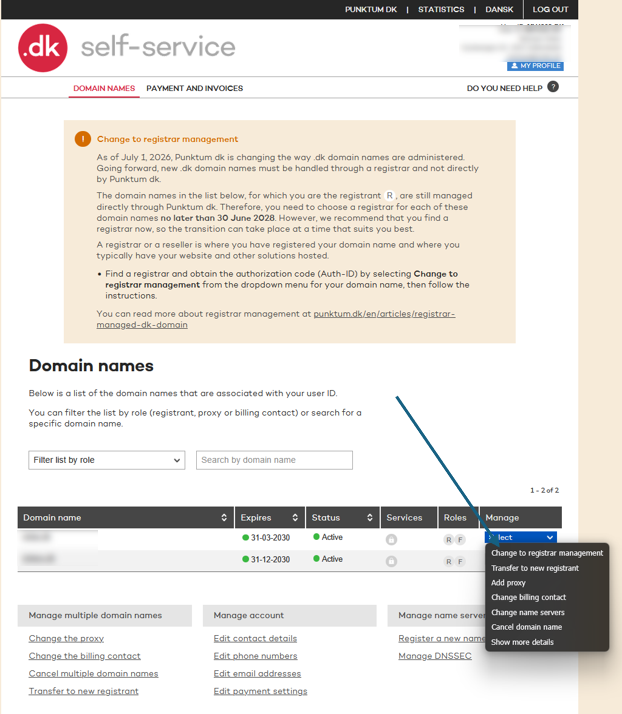
Find your domain in the list of your domain names. Tap "Select" next to the domain and select "Change to Registrar Management."
If you are in doubt about where to press, you can follow the step-by-step instructions with screen shots further down this page.
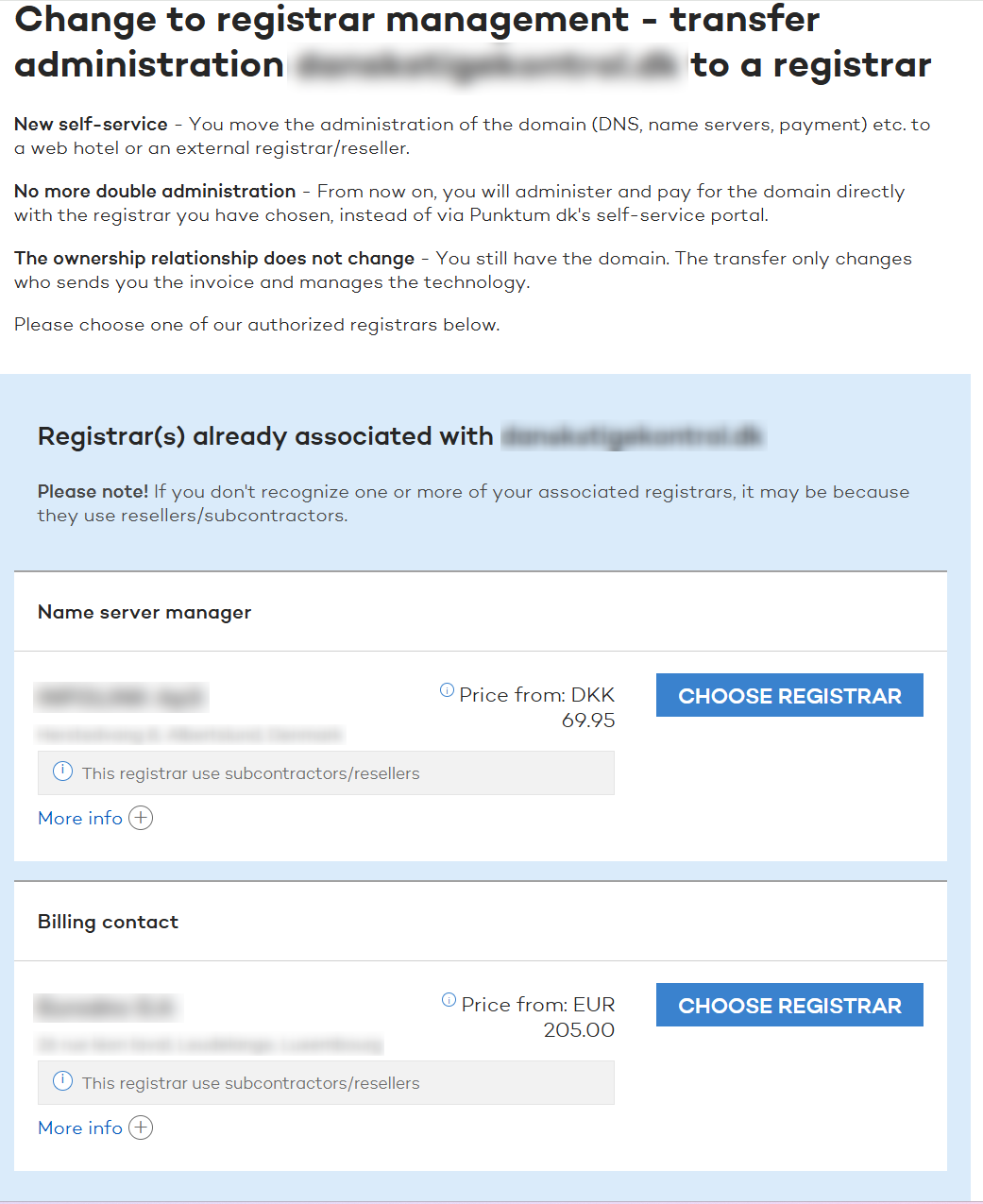
3. See if you already have a registrar
Here you can see if you are alreadya customer at a registrar. For example:
- the registrar the registrar responsible for the mechanics behind your website and email (listed as the "name server manager") and email (listed as the "name server manager")
- The registrar who pays the bill for your domain name (listed as "payer")
4. Choose the registrar
Select the registrar you want to have in the future. After this, one of two things happens, depending on how the registrar has set up its systems:
- If the registrar can accept the transfer directly, tick "Yes, I agree to..." and press "Complete transfer to registrar". Then we will forward the information that the registrar needs.
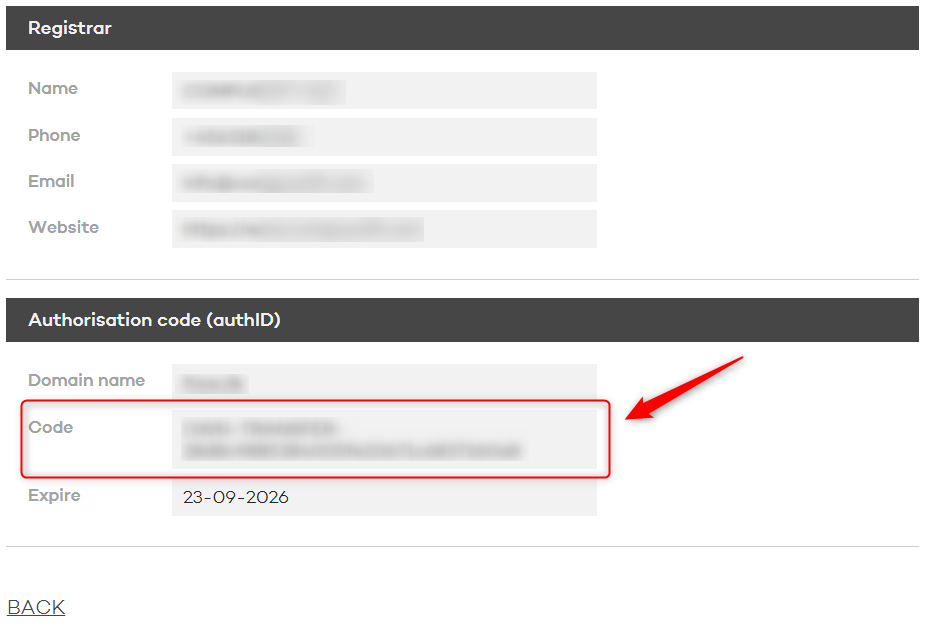
- If the registrar is unable to do so, you will instead be shown a code (authorization code/AuthID) that you can copy. You must pass it on to the registrar, who will use the code to complete the transfer. The code is active for 14 days — if it is not used, you can log in and get a new one.
5. The registrar completes the change
After this, it is the registrar who completes the change. If you have been shown a code, it happens when you have passed the code on to the registrar.
How long this process take varies from registrar to registrar. Some do it quickly because you are already a customer of theirs. Others contact you first — for example, to set you up as a customer, etc.
If you don’t hear anything, or if you are unsure about what is happening to your domain name, you should contact the registrar.ce.
If no registrar is stated
Some domain names do not have a registrar attached and we will therefore not be able to show you the registrar list. In this case you have to find the list yourself, pick a registrar and you have to give the registrar a code to complete the transfer itself.
Here's how:
- Find a registrar on the registrar list. You can also ask the registrar where you already have a website, hosting or e-mail if they can manage your .dk domain name. https://punktum.dk/en/registrar-list
- Get an authorization code (AuthID) in our Self Service. The instructions with pictures can be found further down on this page.
- Give the code to the registrar in the way the retailer asks. If you have received instructions from the registrar in an email, follow them. If in doubt, contact the registrar.
The code is active for 14 days. If it is not used, you can log in and create a new one.
Get an authorisation code (AuthID)
Once you have chosen a registrar, you need to get an authorisation code/AuthID from Punktum dk’s self-service portal.
The code allows the registrar to take over the management of your domain.
You can easily generate an authorization code (AuthID/EPP code) via our self-service portal, which you can then provide to your registrar.
Here's how to do it:
Step 1
Go to self-service.punktum.dk and log on.
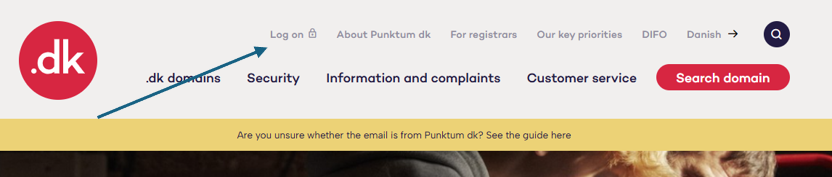
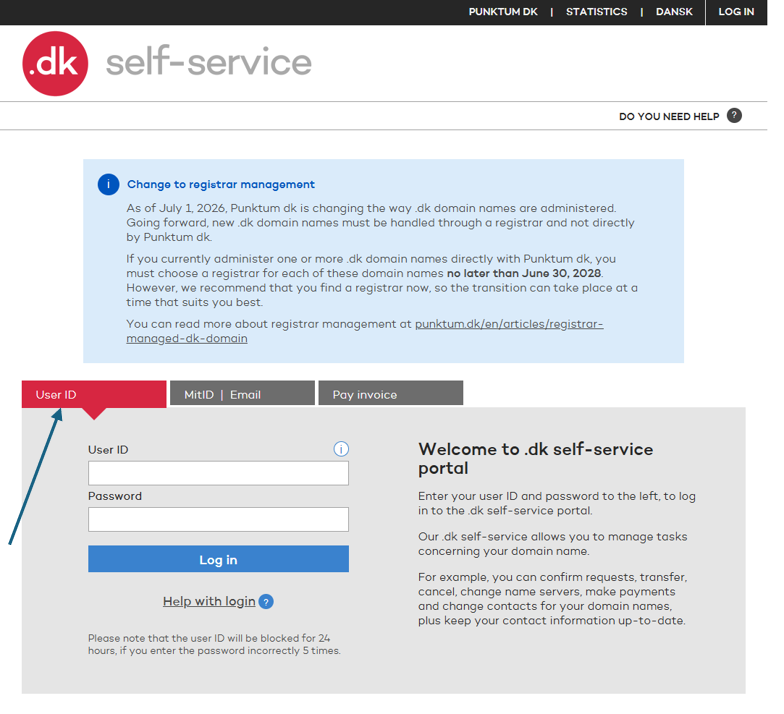
Choose a login method: User ID, MitID, or email.
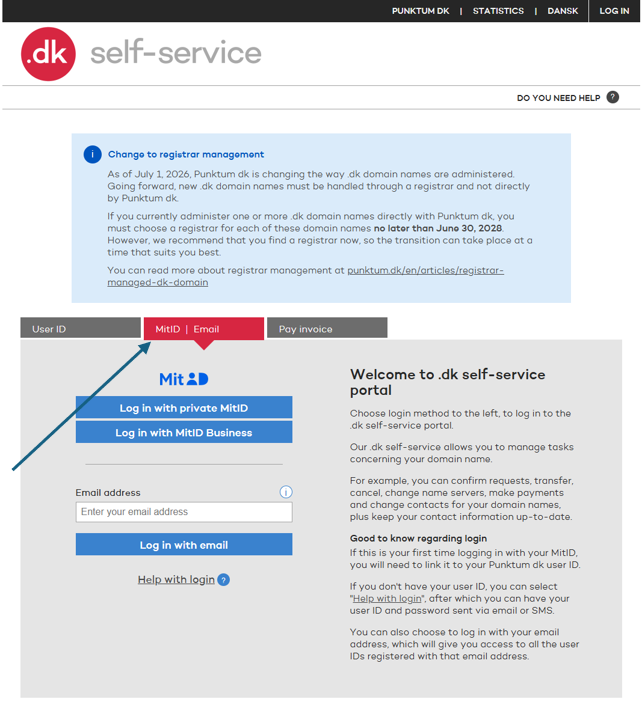
Log in with MitID or your email address.
If you have forgotten your login details or password, get help here.
Step 2
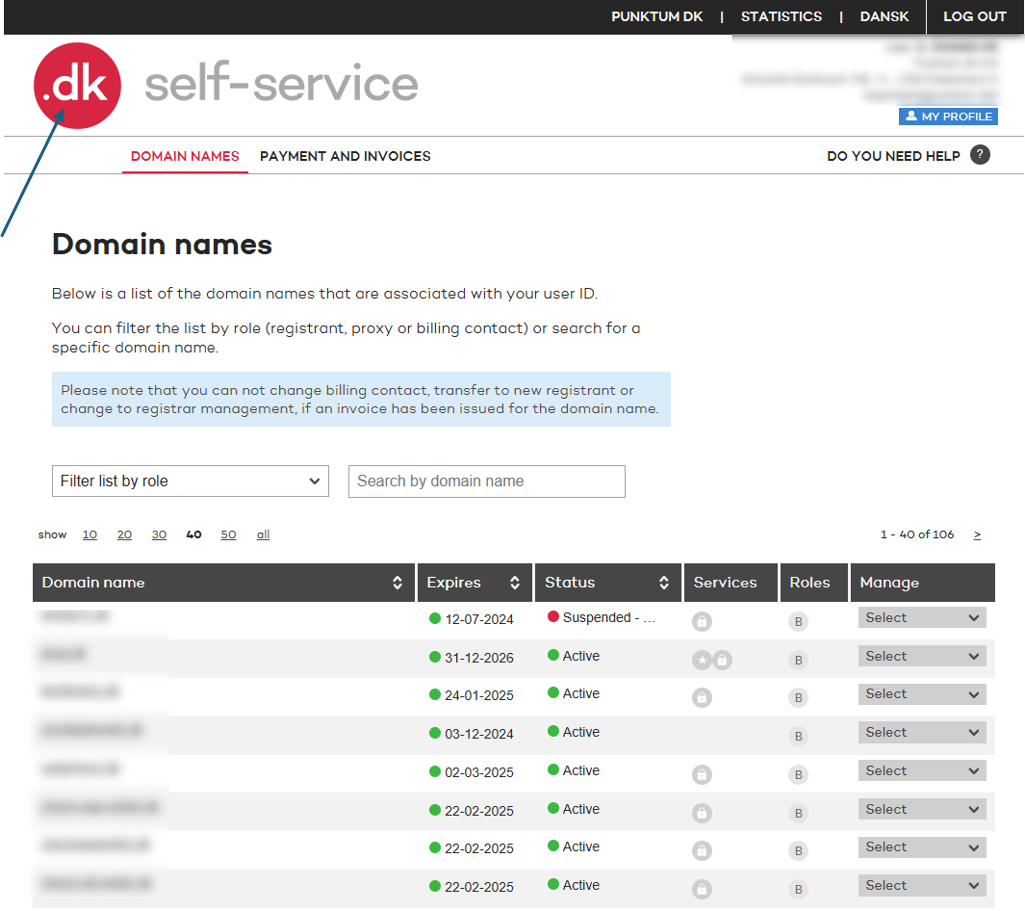
Click the red .dk logo in the top-left corner.
Step 3
Click “Select” under “Manage” on the right, then choose “Change to registrar management.”
Step 4
Once you have selected “Change to registrar management” in Step 3, you will be taken to one of two pages about switching to a registrar.
In many cases, the registrar you already use for services such as domain hosting and/or website hosting will be displayed.
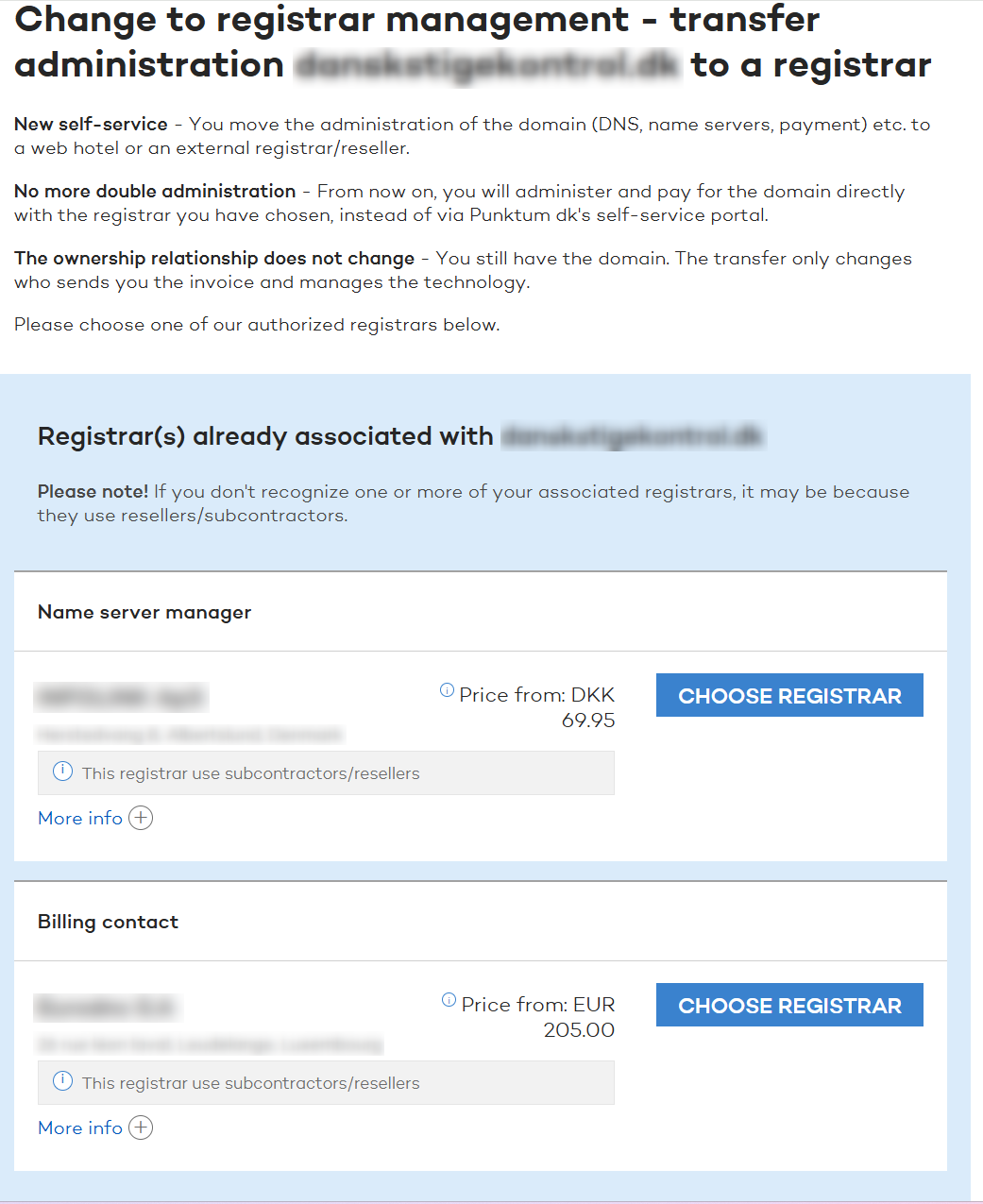
- You will often be taken to the page shown below, where your current registrar’s details have already been filled in. If this is not the page you see, you will see the alternative page instead.
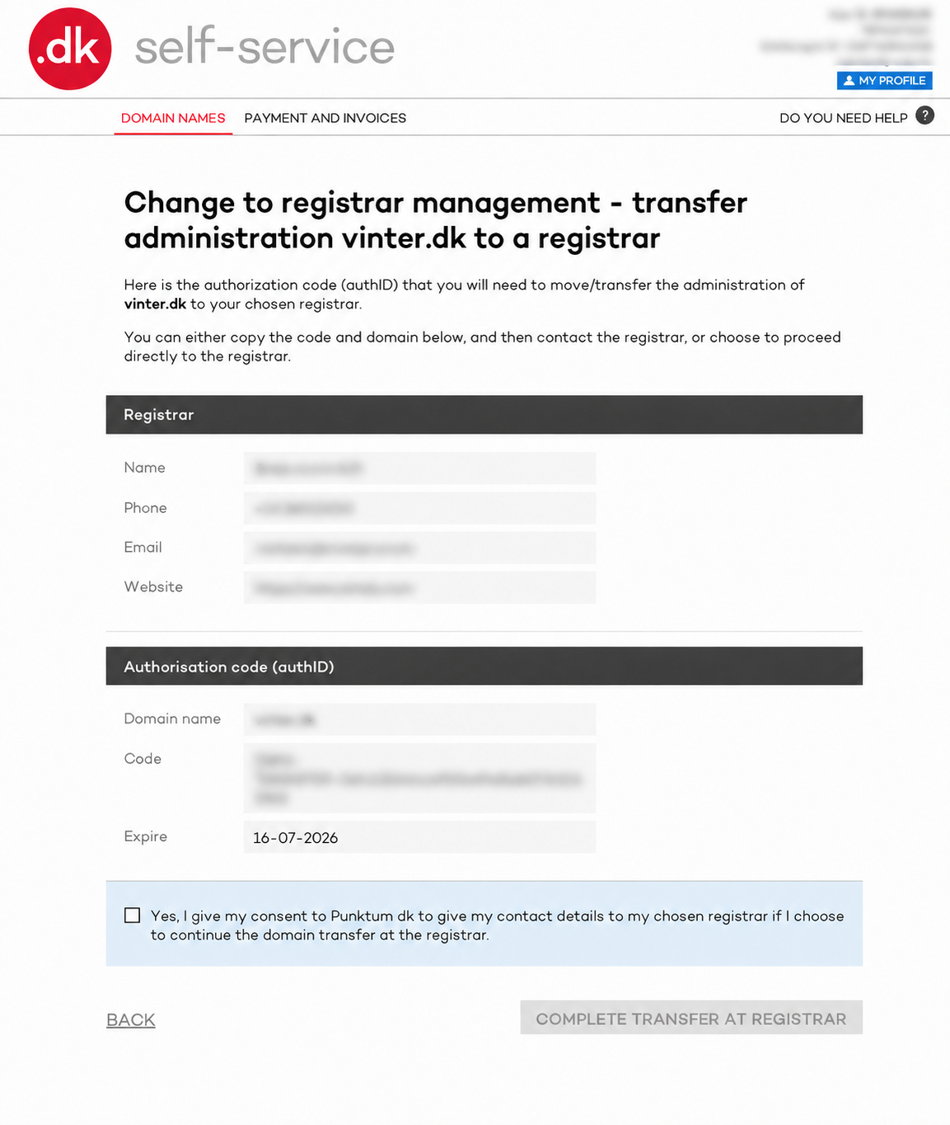
To use the existing registrar, tick “Yes, I understand that...” and click “Complete transfer to registrar.”
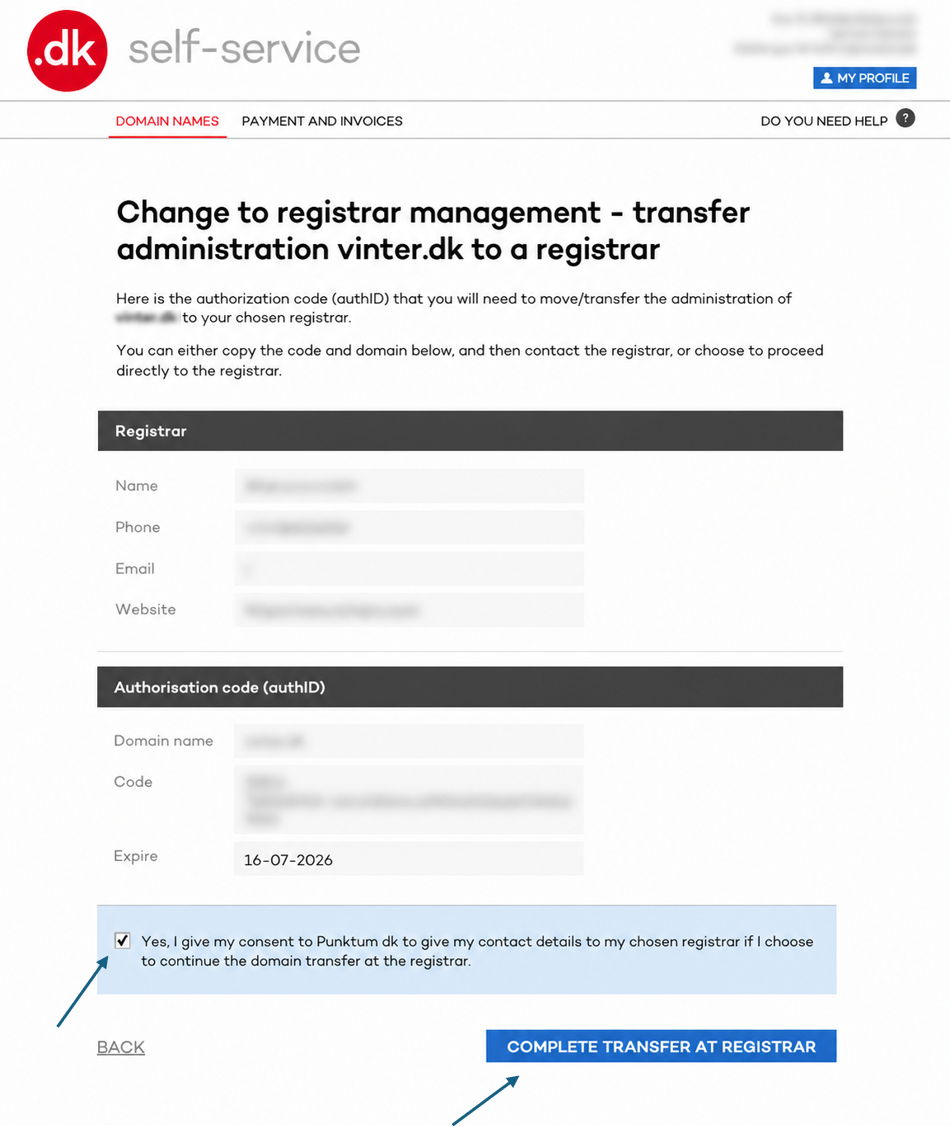
You have now transferred your domain from Punktum dk to your chosen registrar. Repeat this process for all your domains.
To choose a different registrar from the one displayed, select one from the registrar list further down the page.
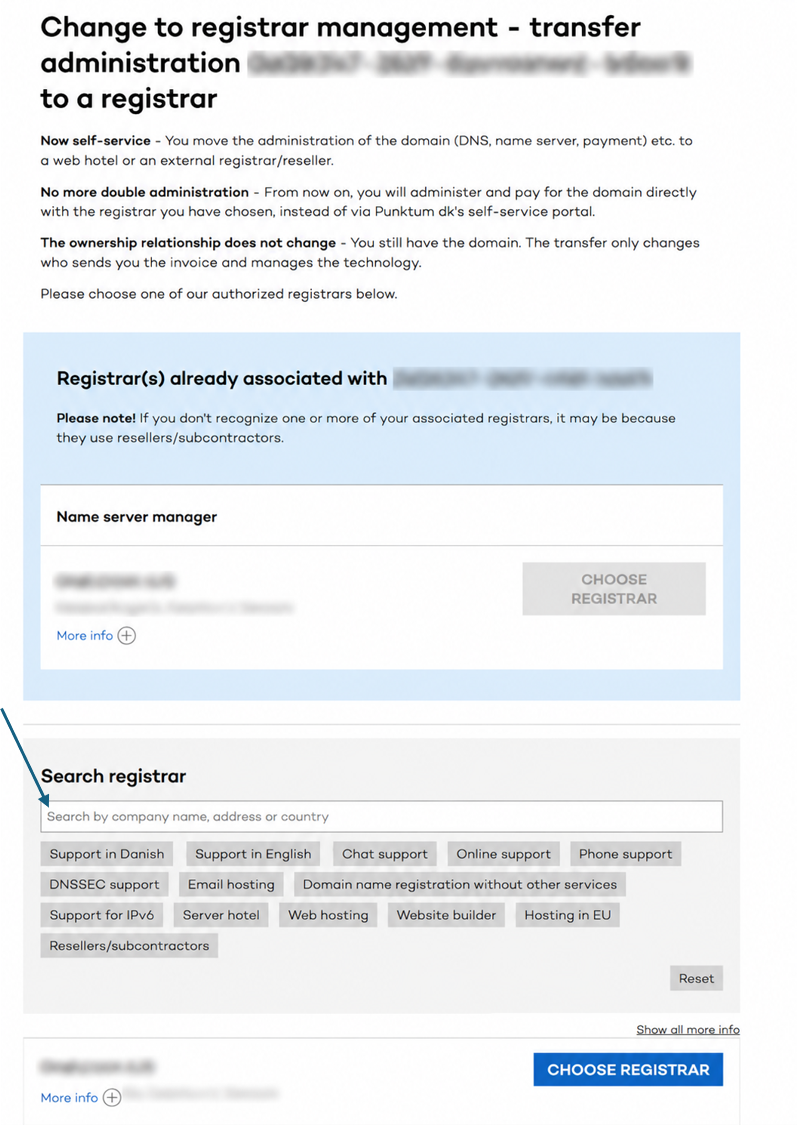
In other cases, you will be taken to a different page where you must generate an Auth ID code and provide it to the registrar.
Once you have selected “Change to registrar management” in Step 3, you will be taken to a page where you can generate the code.
Click “Generate code.”
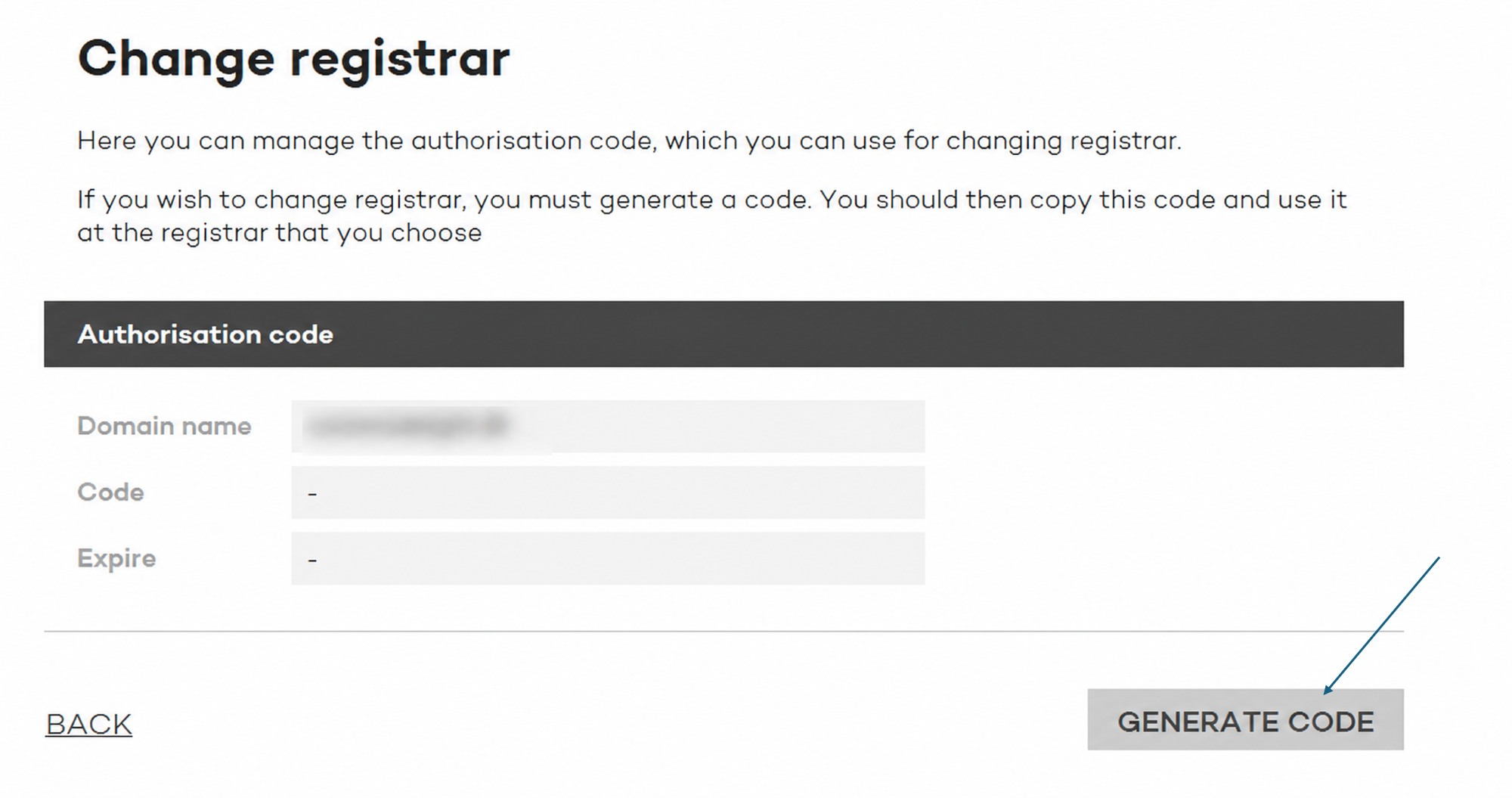
Then copy the code and provide it to the registrar that will manage your domain from now on.
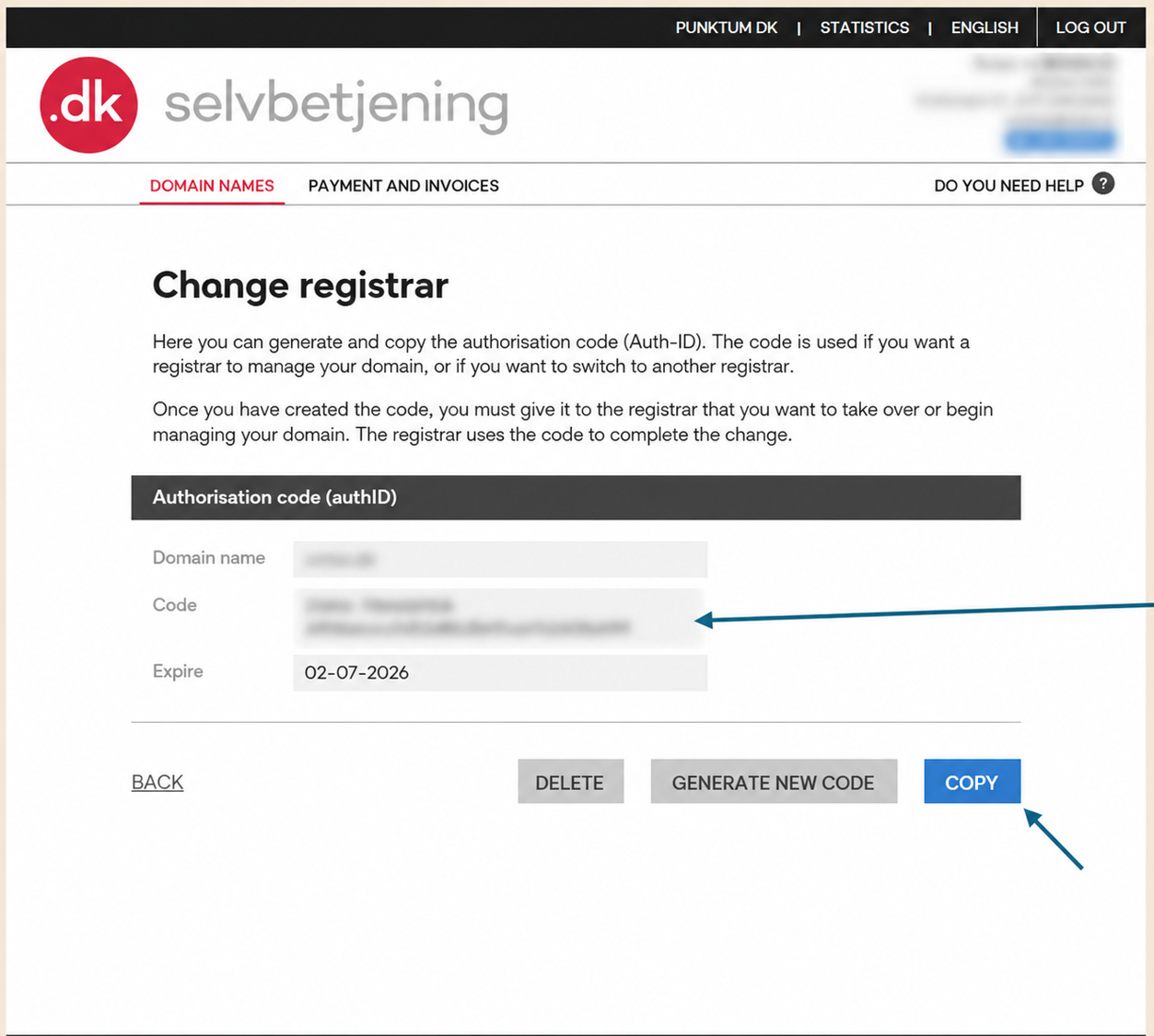
Please note that an Auth ID cannot be generated if the domain has been invoiced or locked, for example due to bankruptcy, liquidation, a merger, or the administration of a deceased estate.
Thank you for your reply
- we are happy about that.
Hmmm, not good...
We will help you - write us.
Did you find the answer useful?
If you still have questions, we are ready to help!
You can easily generate an authorization code (AuthID/EPP code) via our self-service, which you can then pass on to your provider or retailer.
Here's how:
Step 1
Press the 3 lines in the top right corner.

Step 2
Then click “Log in” at the very bottom of the page https://self-service.punktum.dk/:

You can now log in to our self-service under the "user ID" tab.

Or the tab "MitID | Email" further down:

Step 3
Once you are logged in, you should land on the “Domain Names” page.
If not, start by pressing “MENU” in the top right corner:

Step 4
And then select “DOMAIN NAMES”

Scroll down until you see the domain and the “Select box”.

And then select “Change to registrar management”

Step 5
Once you have selected “Change to registrar management” in Step 3, you will be taken to one of two pages about switching to a registrar.
In many cases, the registrar you already use for services such as domain hosting and/or website hosting will be displayed.
- You will often be taken to the page shown below, where your current registrar’s details have already been filled in. If this is not the page you see, you will see the alternative page instead.

To use the existing registrar, tick “Yes, I understand that...” and click “Complete transfer to registrar.”
To choose a different registrar from the one displayed, select one from the registrar list further down the page.
In other cases, you will be taken to a different page where you must generate an Auth ID code and provide it to the registrar.
Once you have selected “Change to registrar management” in Step 3, you will be taken to a page where you can generate the code.
Then tap the "GENERATE CODE" button

An authorization code/transfer code is now generated which can be given to the registrar/webhost:

The code is valid for 14 days. If it is not used, the registrant can always log in to Punktum dk's self-service and generate a new code.
Thank you for your reply
- we are happy about that.
Hmmm, not good...
We will help you - write us.
Did you find the answer useful?
If you still have questions, we are ready to help!
Are you stuck?
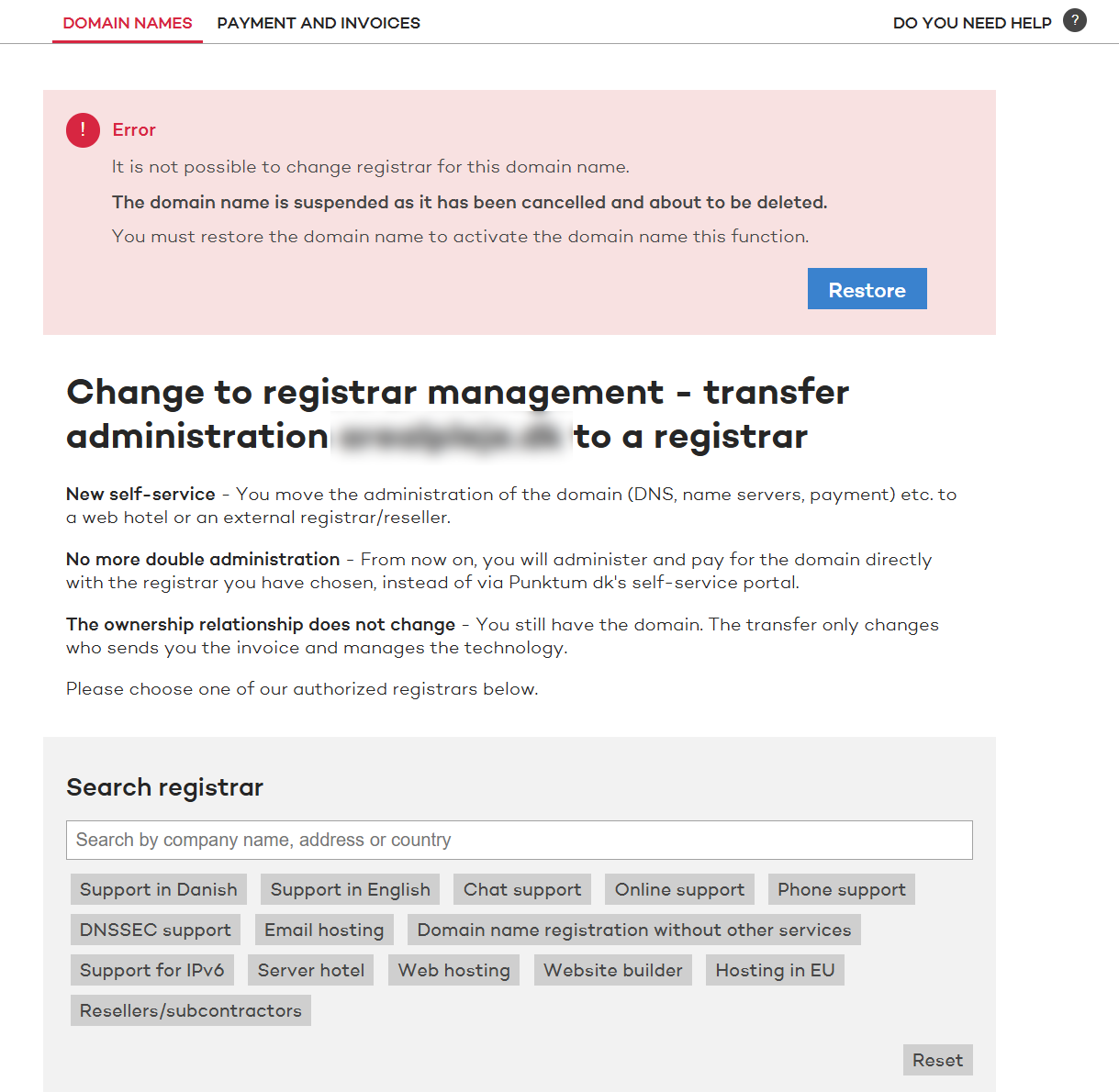
Some domain names cannot change to registrar management immediately. For example, it may be because there is an unpaid invoice or because the domain name is locked. This happens in bankruptcy, liquidation, mergers and estate, among other things.
If it concerns your domain name, you will be told on the screen along with the reason. Then you can see what needs to fall into place before you can move on. If you are in doubt, you are welcome to contact our customer service.