Do you need to contact us?
We are ready to help you if you have any questions about your .dk domain.
Our customer service staff will respond to your inquiry as soon as possible.

Existing .dk domain names with a long subscription period will not be affected when the transition period begins on July 1, 2026.
All registrants must choose a registrar – even if they have .dk domain names that have been paid for more than one year in advance. Punktum dk will ensure that all domain names with a remaining validity of more than one year will remain active for the entire prepaid period, at the price already paid.
However, it will no longer be possible to renew a domain for a new “multi-year” period. For example, if you currently have a five-year or ten-year .dk domain name, it will remain valid for the full duration of that period.
After that, renewals will be invoiced on a yearly basis.
Thank you for your reply
- we are happy about that.
Hmmm, not good...
We will help you - write us.
Did you find the answer useful?
If you still have questions, we are ready to help!
The base price for a .dk domain will remain DKK 72.50 and will continue to follow the price index.
However, registrars may charge an administrative fee or other additional fees, which Punktum dk does not control. Whether the overall price becomes higher depends on the individual registrar.
In some cases, the total price for a .dk domain may actually be lower than Punktum dk’s standard price – it is up to each registrar to set their own pricing.
Therefore, it’s important to choose the registrar that best suits your needs.
Thank you for your reply
- we are happy about that.
Hmmm, not good...
We will help you - write us.
Did you find the answer useful?
If you still have questions, we are ready to help!
No, there are no fees charged by Punktum dk for transferring a domain name to registrar management.
How the transfer of your .dk domain name(s) takes place depends on the registrar you choose.
You will still be able to obtain an authorization code through the self-service portal to transfer your .dk domain.
Thank you for your reply
- we are happy about that.
Hmmm, not good...
We will help you - write us.
Did you find the answer useful?
If you still have questions, we are ready to help!
You can easily generate an authorization code (AuthID/EPP code) via our self-service portal, which you can then provide to your registrar.
Here's how to do it:
Step 1
Go to self-service.punktum.dk and log on.
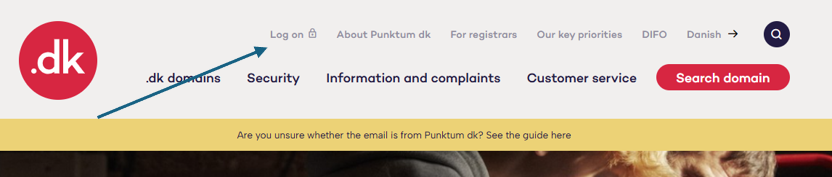
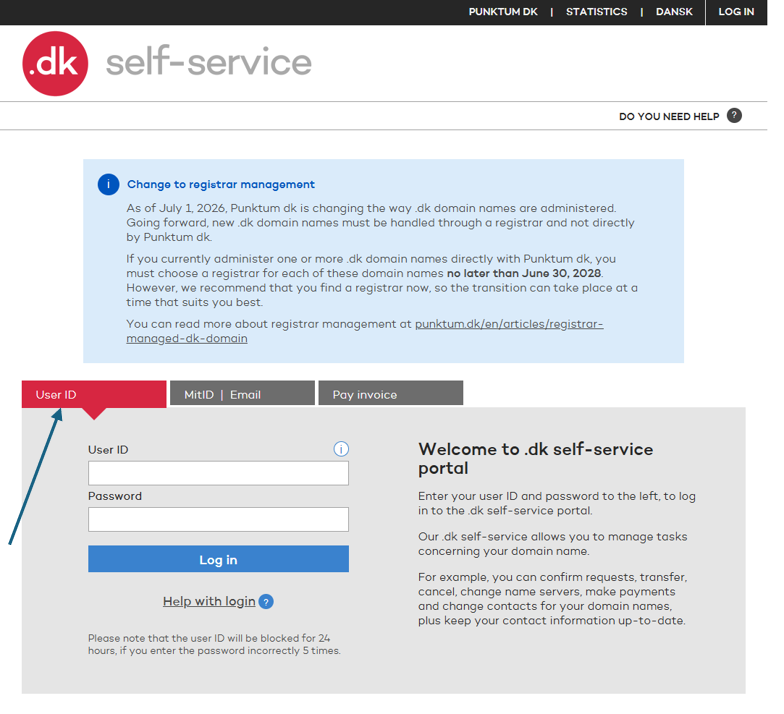
Choose a login method: User ID, MitID, or email.
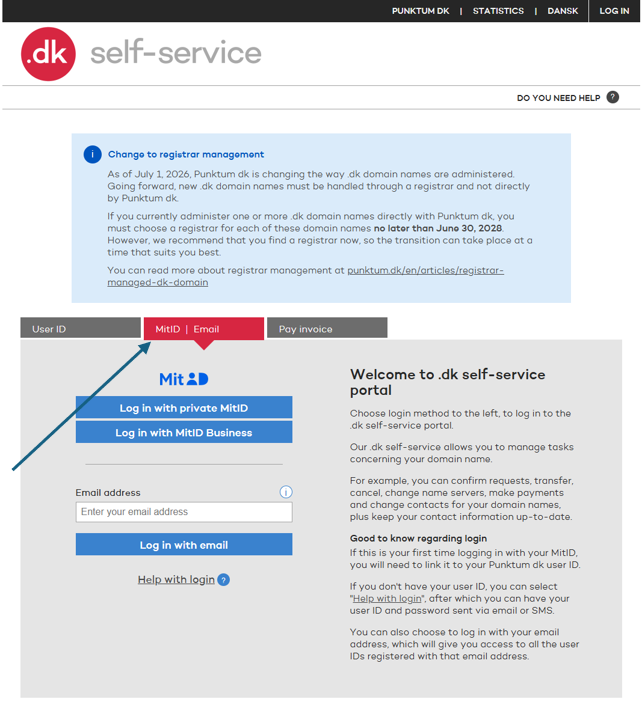
Log in with MitID or your email address.
If you have forgotten your login details or password, get help here.
Step 2
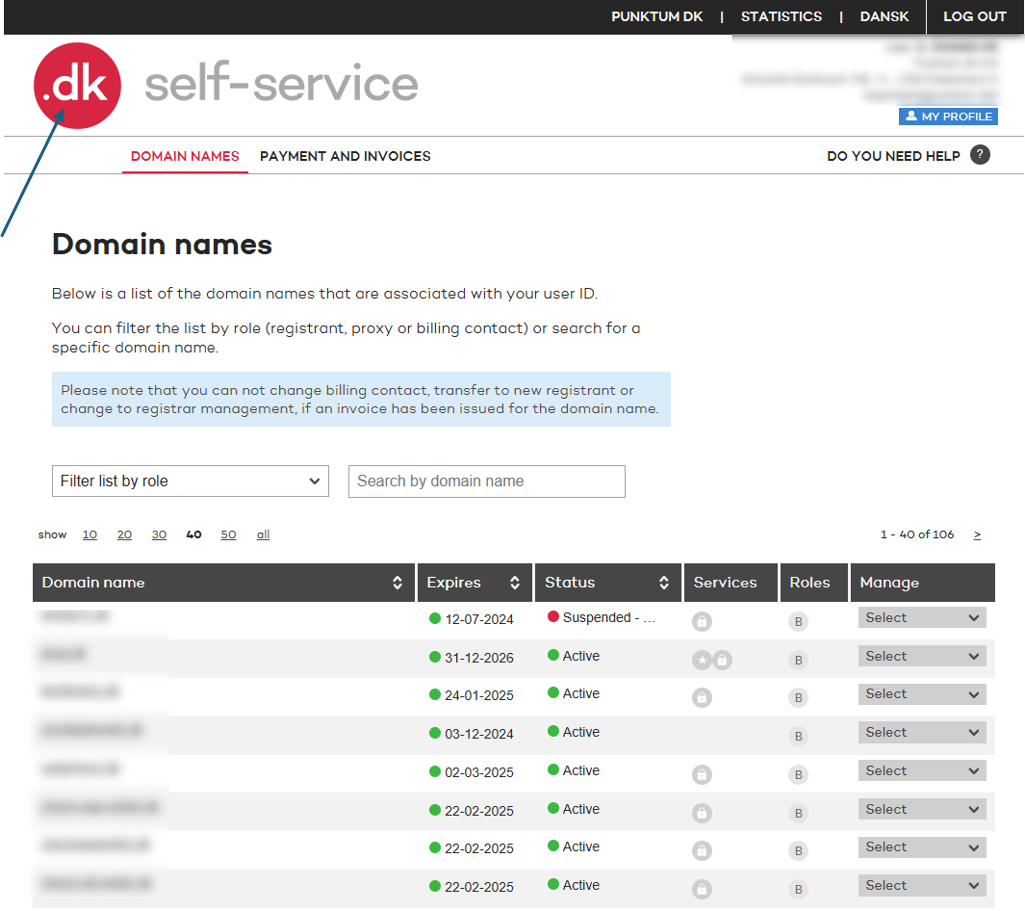
Click the red .dk logo in the top-left corner.
Step 3
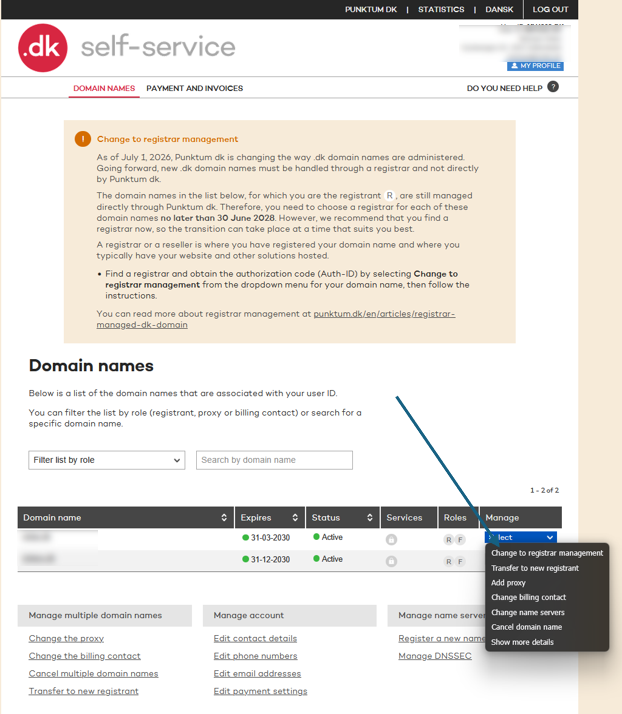
Click “Select” under “Manage” on the right, then choose “Change to registrar management.”
Step 4
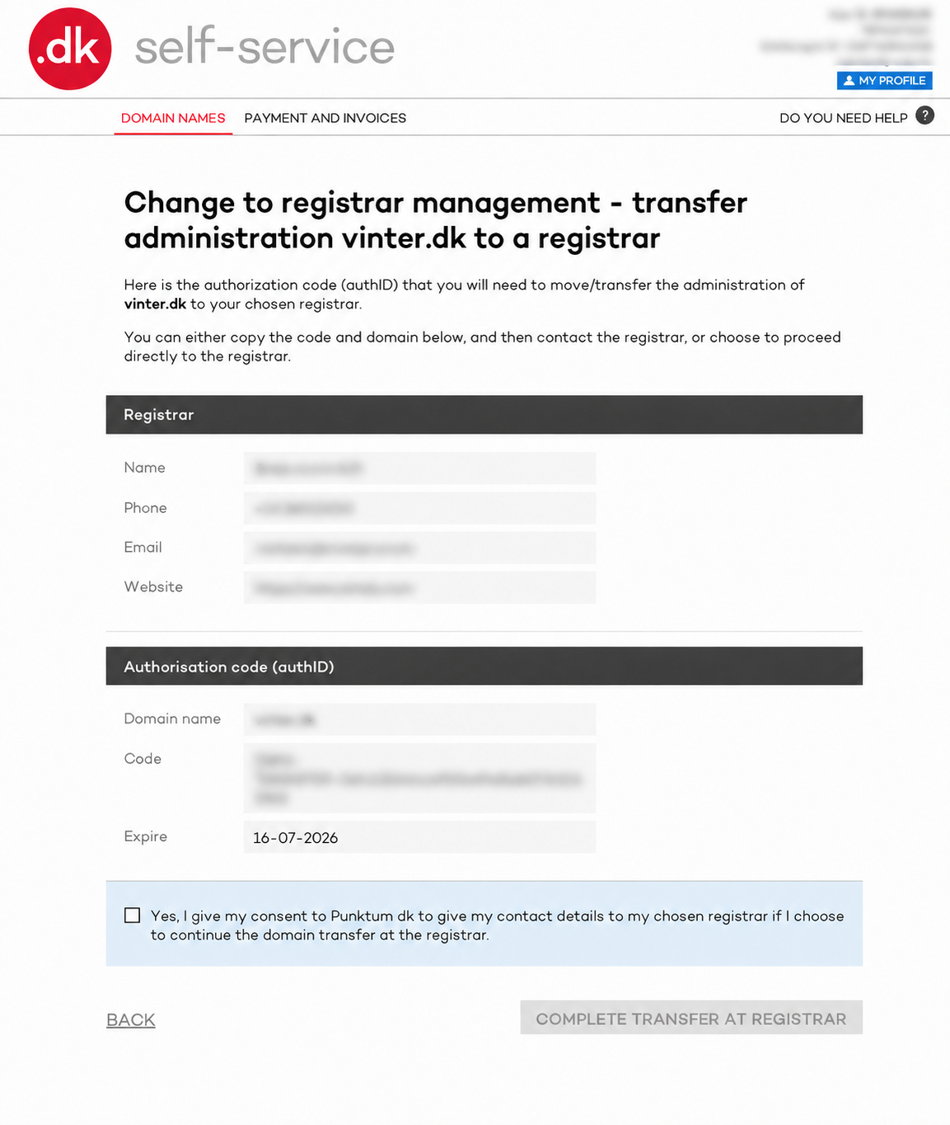
Once you have selected “Change to registrar management” in Step 3, you will be taken to one of two pages about switching to a registrar.
In many cases, the registrar you already use for services such as domain hosting and/or website hosting will be displayed.
- You will often be taken to the page shown below, where your current registrar’s details have already been filled in. If this is not the page you see, you will see the alternative page instead.
To use the existing registrar, tick “Yes, I understand that...” and click “Complete transfer to registrar.”
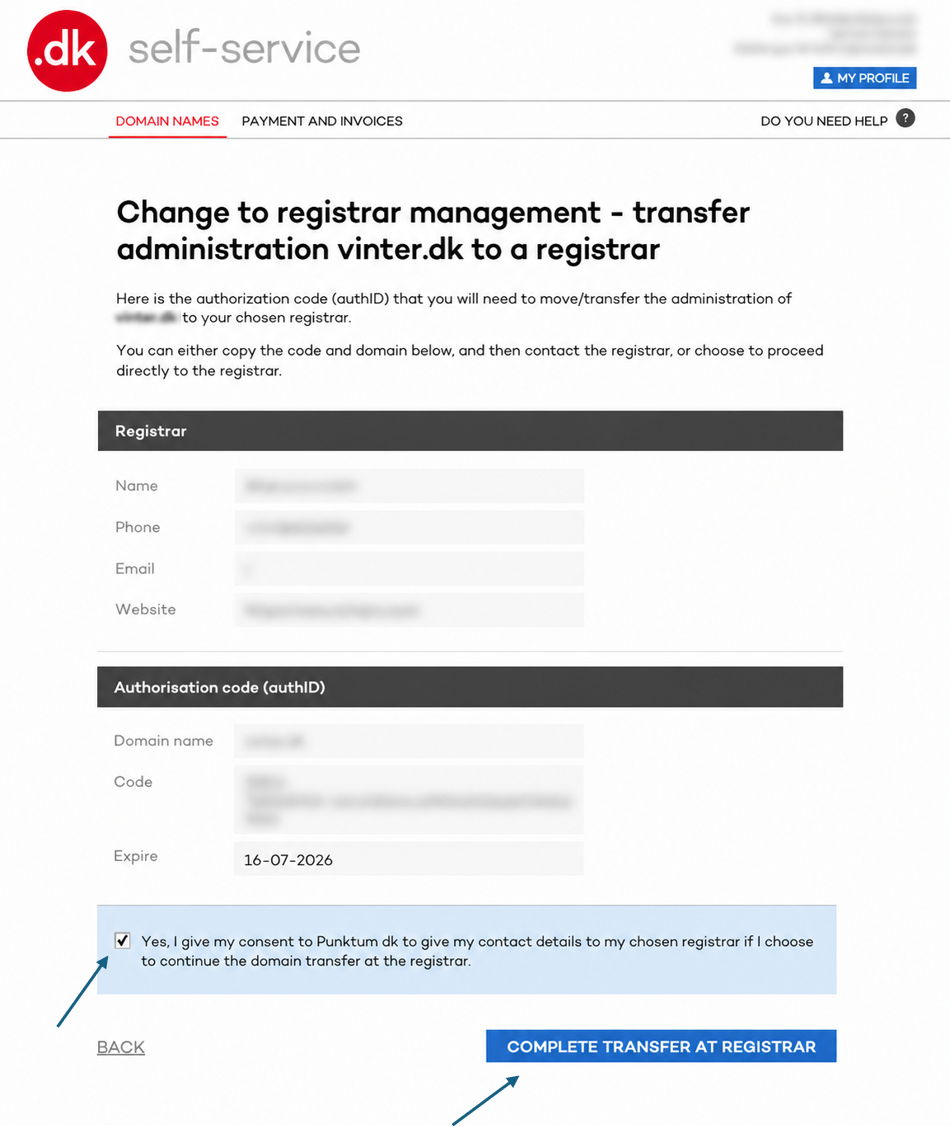
You have now transferred your domain from Punktum dk to your chosen registrar. Repeat this process for all your domains.
To choose a different registrar from the one displayed, select one from the registrar list further down the page.
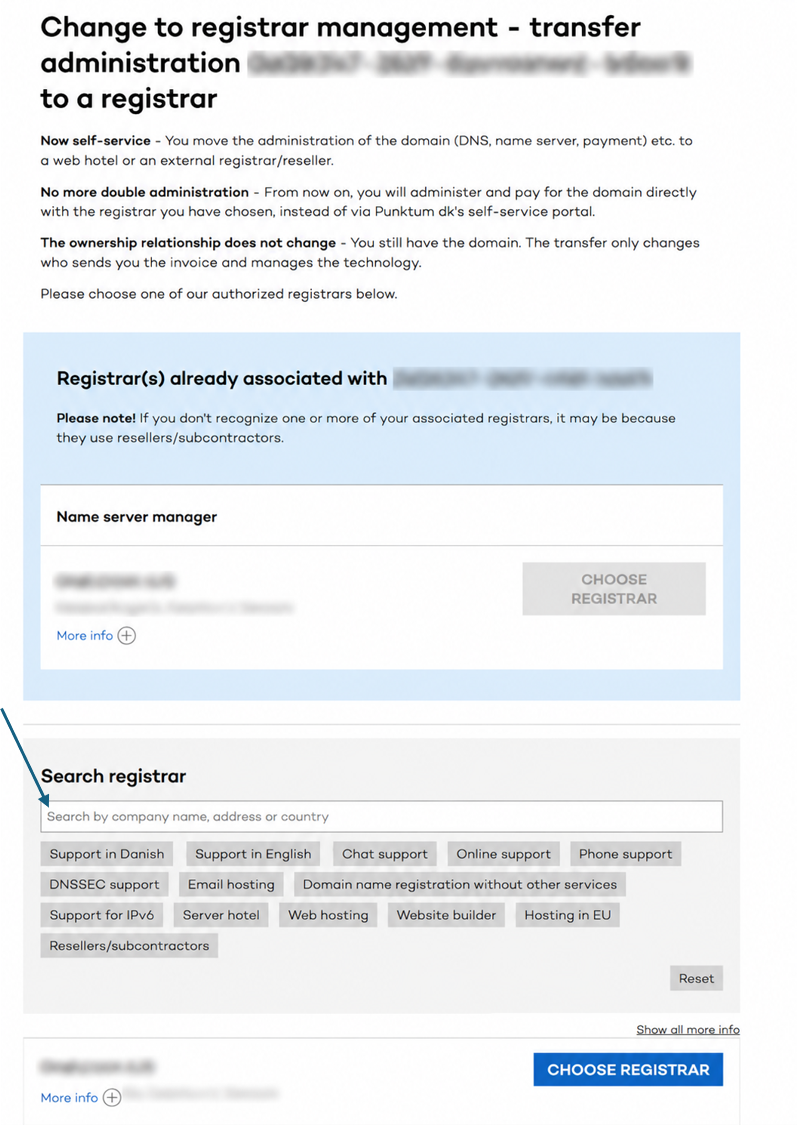
In other cases, you will be taken to a different page where you must generate an Auth ID code and provide it to the registrar.
Once you have selected “Change to registrar management” in Step 3, you will be taken to a page where you can generate the code.
Click “Generate code.”
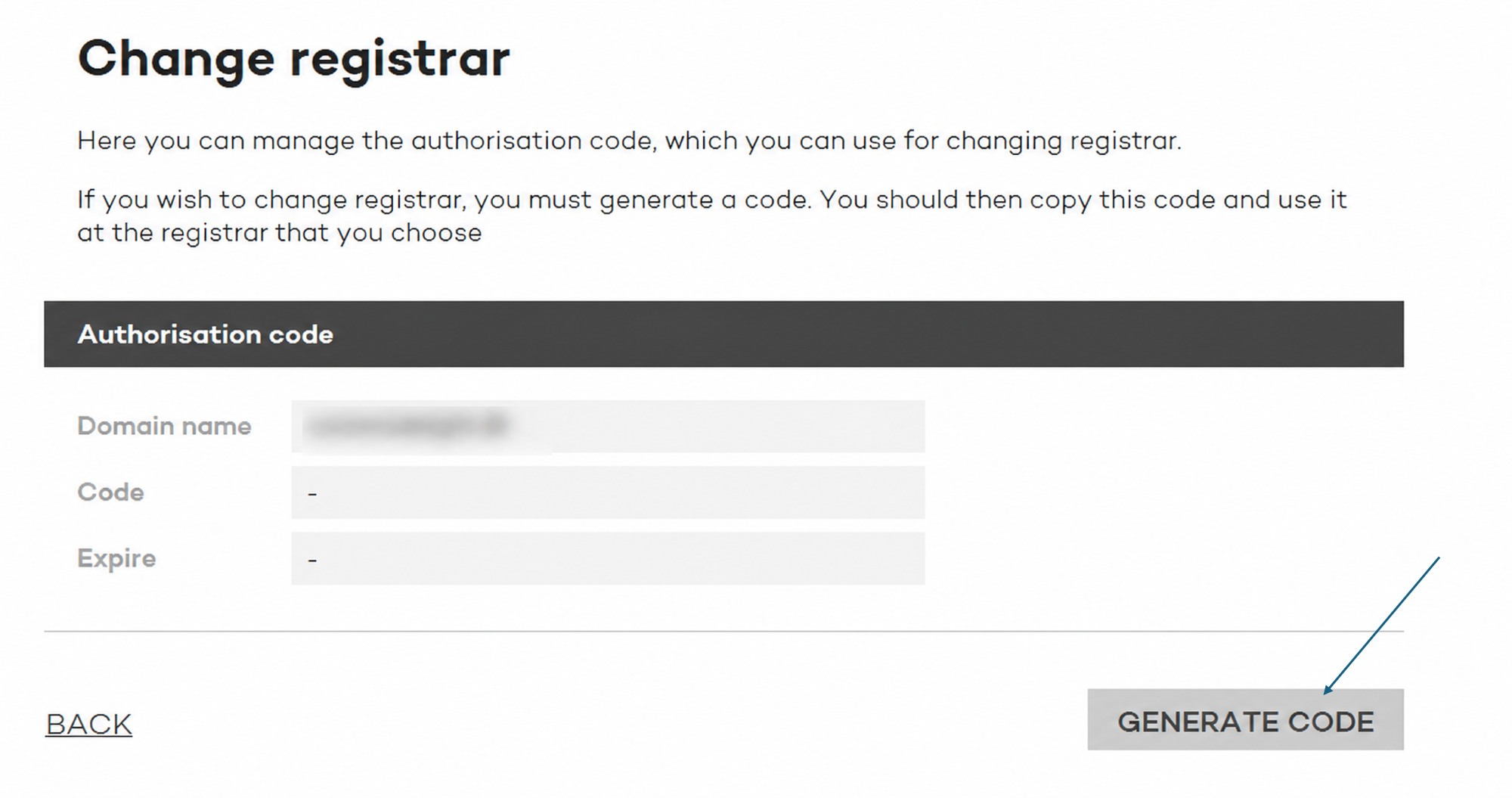
Then copy the code and provide it to the registrar that will manage your domain from now on.
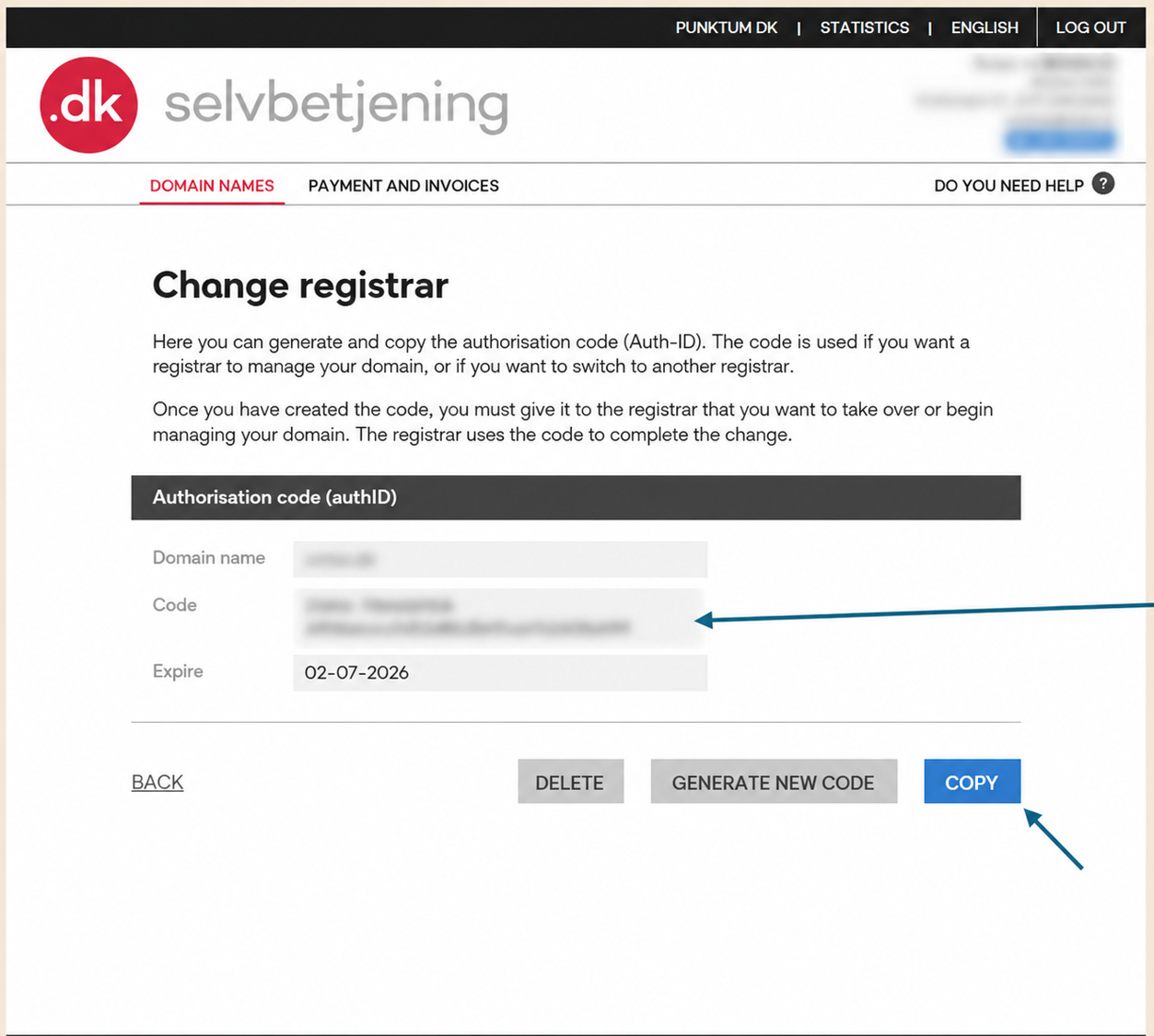
Please note that an Auth ID cannot be generated if the domain has been invoiced or locked, for example due to bankruptcy, liquidation, a merger, or the administration of a deceased estate.
Thank you for your reply
- we are happy about that.
Hmmm, not good...
We will help you - write us.
Did you find the answer useful?
If you still have questions, we are ready to help!
If you have questions about the publication of phone numbers in WHOIS for .dk domains, you can find answers to the most common ones in our FAQ below
Why do you publish phone numbers for companies, public institutions, and associations?
As the administrator of the .dk domain, we are obligated under the Danish Domain Names Act to publish the registrant's name, address, and phone number – unless otherwise provided by other legislation.
What information is published?
For registrants who are not private individuals (e.g., companies, associations, and public institutions), the following information is published:
• Name
• Address
• Phone number (unless it is unlisted)
Have you previously hidden phone numbers?
Yes. When the ability to automatically check whether a phone number was unlisted was removed, we chose – as a precaution – to hide all phone numbers, even if they were not unlisted.
What has changed now?
We have reviewed and updated our data, and all phone numbers that are not unlisted with the telecom provider are now once again published in WHOIS.
How do I hide my phone number?
- Contact your telecom provider and have the number registered as unlisted.
Submit documentation of the unlisted status to us.
Once we have received and verified the documentation, we will hide your phone number in the WHOIS database.
Thank you for your reply
- we are happy about that.
Hmmm, not good...
We will help you - write us.
Did you find the answer useful?
If you still have questions, we are ready to help!
Have you experienced that your nameservers or email settings have been changed without your awareness?
If you suspect unauthorized changes, please contact our customer service as soon as possible. You can either use our contact form or call us at +45 33 64 60 60 for direct assistance.
Thank you for your reply
- we are happy about that.
Hmmm, not good...
We will help you - write us.
Did you find the answer useful?
If you still have questions, we are ready to help!
You can easily generate an authorization code (AuthID/EPP code) via our self-service, which you can then pass on to your provider or retailer.
Here's how:
Step 1
Press the 3 lines in the top right corner.

Step 2
Then click “Log in” at the very bottom of the page https://self-service.punktum.dk/:

You can now log in to our self-service under the "user ID" tab.

Or the tab "MitID | Email" further down:

Step 3
Once you are logged in, you should land on the “Domain Names” page.
If not, start by pressing “MENU” in the top right corner:

Step 4
And then select “DOMAIN NAMES”

Scroll down until you see the domain and the “Select box”.

And then select “Change to registrar management”

Step 5
Once you have selected “Change to registrar management” in Step 3, you will be taken to one of two pages about switching to a registrar.
In many cases, the registrar you already use for services such as domain hosting and/or website hosting will be displayed.
- You will often be taken to the page shown below, where your current registrar’s details have already been filled in. If this is not the page you see, you will see the alternative page instead.

To use the existing registrar, tick “Yes, I understand that...” and click “Complete transfer to registrar.”
To choose a different registrar from the one displayed, select one from the registrar list further down the page.
In other cases, you will be taken to a different page where you must generate an Auth ID code and provide it to the registrar.
Once you have selected “Change to registrar management” in Step 3, you will be taken to a page where you can generate the code.
Then tap the "GENERATE CODE" button

An authorization code/transfer code is now generated which can be given to the registrar/webhost:

The code is valid for 14 days. If it is not used, the registrant can always log in to Punktum dk's self-service and generate a new code.
Thank you for your reply
- we are happy about that.
Hmmm, not good...
We will help you - write us.
Did you find the answer useful?
If you still have questions, we are ready to help!
If you wish to cancel your VID service, this must be done by logging into our self-service:
https://self-service.punktum.dk/
Here you must log in via MitID or user ID and password
- Tap the red logo at the top of the page on the left
- Tap your domain name in the middle of the page
- Go to next page
- Tap " Cancel VID Service "
You will then receive an e-mail and a link to cancel VID. If your email address is not updated, we will send it as a registered letter to the VID contact.
Customer service will receive information that you want VID service terminated and will contact you by phone to send your code.
You must apply your code to the link provided after you have logged in to our website
Thank you for your reply
- we are happy about that.
Hmmm, not good...
We will help you - write us.
Did you find the answer useful?
If you still have questions, we are ready to help!
You need to choose a registrar because, going forward, .dk domain names must be managed through a registrar and not directly with Punktum dk.
We are changing the model to make it simpler for you to have a .dk domain name. In future, you will only need to contact one place when you need help with your domain name: your registrar.
For many people, it will be natural to choose the registrar they already use for their website, web hosting or other services.
Thank you for your reply
- we are happy about that.
Hmmm, not good...
We will help you - write us.
Did you find the answer useful?
If you still have questions, we are ready to help!
No, your .dk domain name cannot continue to be managed directly by Punktum dk after 30 June 2028.
If your .dk domain name is currently managed by Punktum dk, you must therefore choose a registrar no later than 30 June 2028.
You do not need to do anything right now, but you must choose a registrar before the deadline. Once you have chosen a registrar, they can help you with the next steps.
Thank you for your reply
- we are happy about that.
Hmmm, not good...
We will help you - write us.
Did you find the answer useful?
If you still have questions, we are ready to help!


How can we help you?
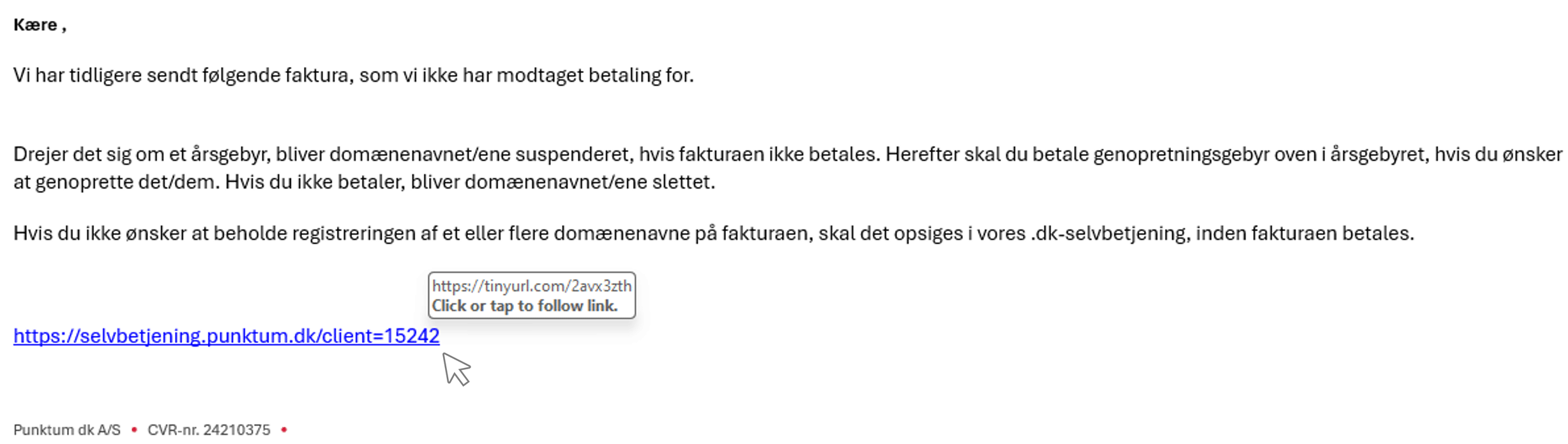
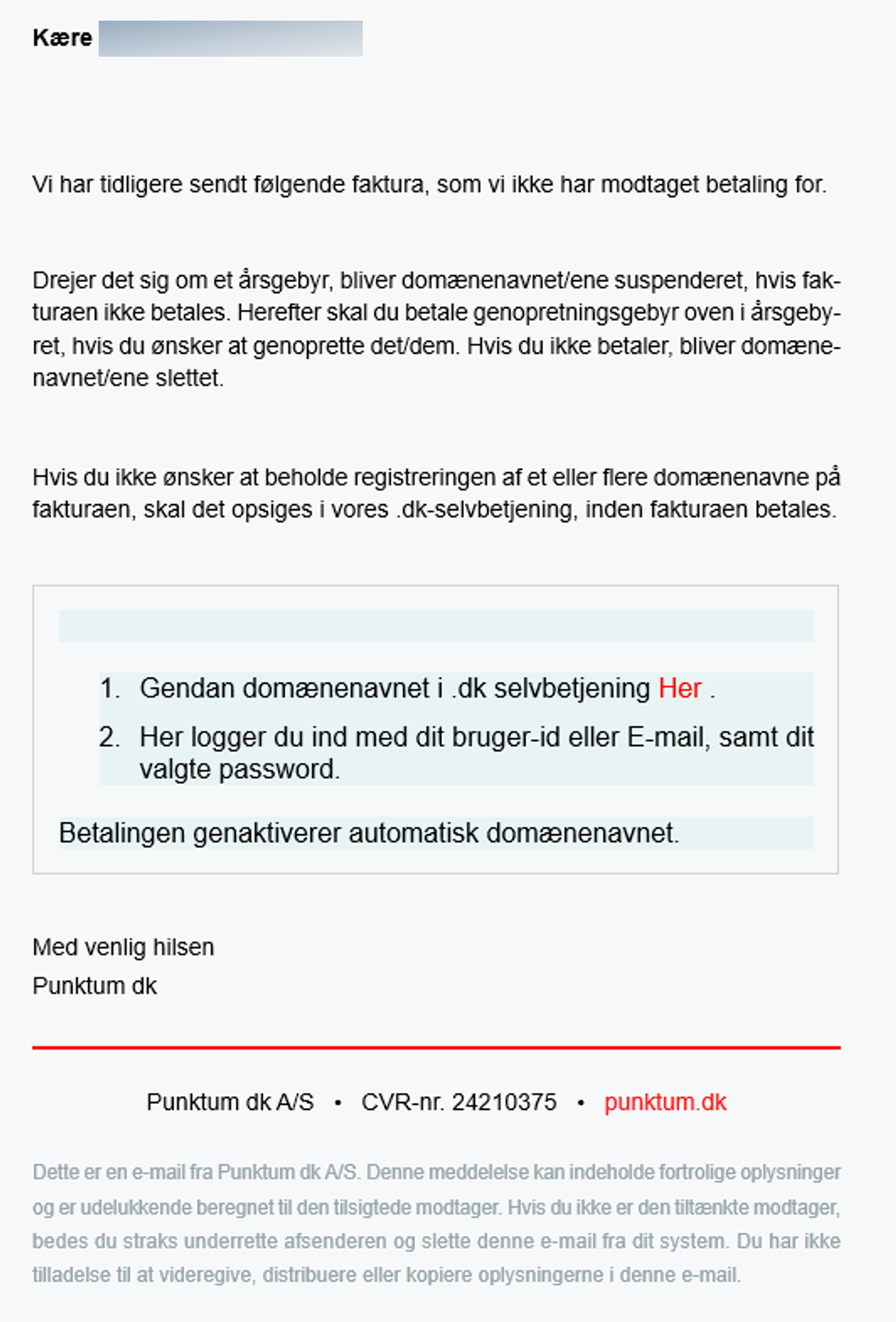
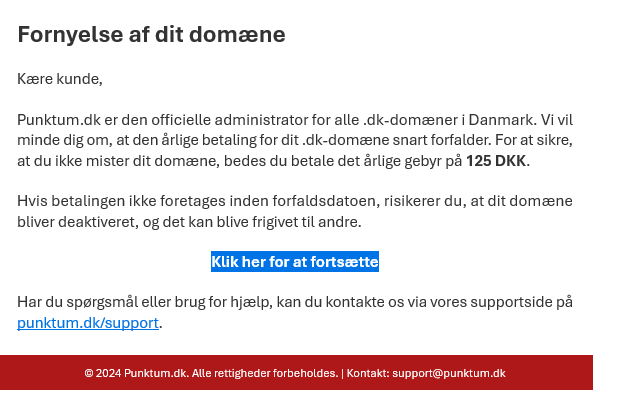
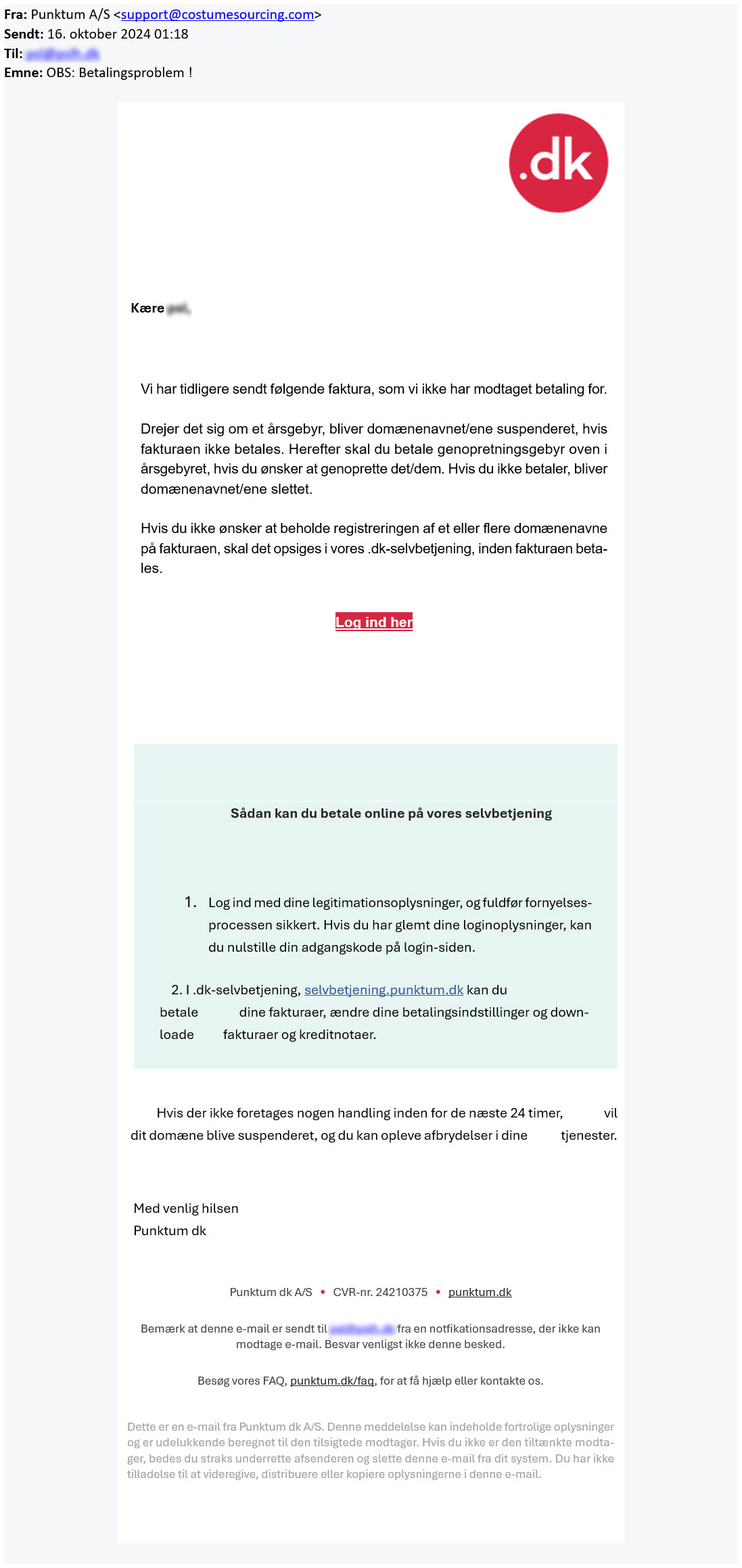
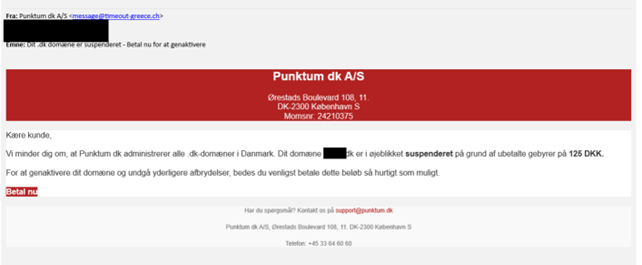
Unfortunately, we are currently experiencing fake emails regarding suspension of .dk domain names. We are working to prevent this.
Punktum dk's websites have been cloned, making it seem like you are at the correct place. If you receive a fake email, do not make any payments through the payment link!
How can I tell if it's a fake email?
Always check the sender’s email address. We never send mail from admin@dk-hostmaster.dk
Emails from us will always come from “noreply@punktum.dk” — BUT scammers can send phishing emails that appear to come from Punktum dk. Sometimes they use email addresses or domain names that look similar to ours. Other times, the sender may be manipulated so that the email appears to come from an address ending in @punktum.dk.
Therefore, it is not always enough to look only at the sender address, even if it ends in @punktum.dk.
If you are unsure whether an email is from us, we recommend that you do not click any links in the email. This applies especially to emails about suspension, invoicing, payment, notices, or similar matters. Instead, go directly to https://selvbetjening.punktum.dk/ yourself and check the status of your .dk domain names. This will give you a secure overview of whether there is anything you need to do.
We also send questionnaires from the address @relationmonitor.com
Some of the fake emails use these endings:
@punktum.in
@paysafe.dk
@amian-louis.atlassian.net
@summersetdestinations.com
@uni-erfurt.de
@punktum.com
@ventevo.pk
@uni-erfurt.de
@pouriaahmadi.com
Below you can see examples of the fake emails that are circulating:
NOTE: Please be especially aware that there may be another link hidden behind the link in the text.
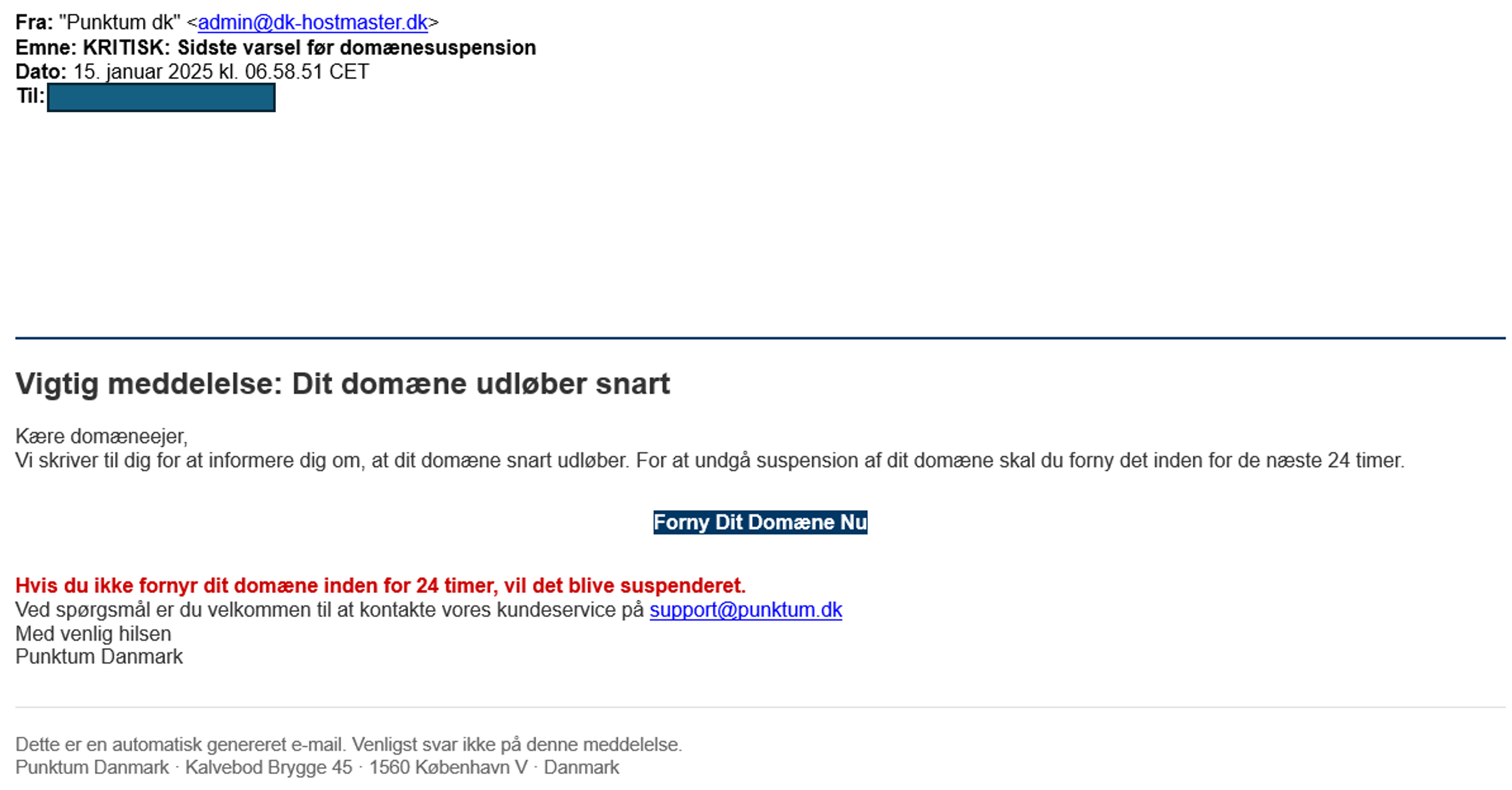


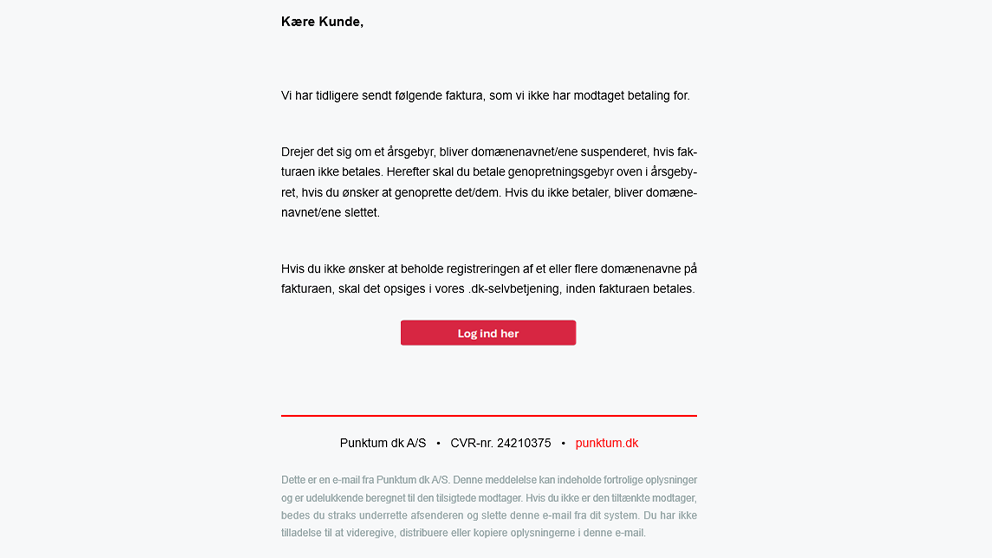
If you have filled in your login information on the fake login page, we recommend that you immediately log in to our self-service portal and change your password.
If you have received a fake email, we would like to see what it looks like. You can forward it to svindel@punktum.dk.
Have you received an email about suspension or payment?
We are also sending out legitimate emails regarding suspension. Therefore, we recommend that you log in to our self-service portal and check whether your .dk domain name has been suspended.
If your domain name is not working, it has likely been suspended. Read more here about what you can do to restore it.
Thank you for your reply
- we are happy about that.
Hmmm, not good...
We will help you - write us.
Did you find the answer useful?
If you still have questions, we are ready to help!
If you are experiencing issues with your e-mail address or website, it may be due to one of the following reasons.
Missing payment with Punktum dk
If we have not received payment for the renewal of your .dk domain name, the domain will be suspended by us. If your domain name is suspended and you have an email or a website that includes the domain, it will no longer work.
You can restore your domain name by logging into our online self-service portal. You can follow our instructions by clicking here.
Missing validation
At Punktum dk, as the registrant, you are required to complete an ID verification when you activate your domain.
We do this to ensure accurate information and secure your right to use the domain.
If the ID verification is not completed within the given deadline, the domain will be suspended and deleted 30 days thereafter.
The domain will be automatically restored/activated once you log in to the self-service portal.
Setup with your DNS provider
When you hold the right to use a domain name, you are a customer at Punktum dk. You also have a registration with your provider, who handles your hosting (setting up e-mail or website).
It is therefore necessary that your setup with the provider is correctly configured. They may have deactivated the domain due to a lack of maintenance, such as payment and updating contact information. It is therefore important to maintain both agreements. If the problem is with the provider, you need to contact your provider to have the domain restored.
Thank you for your reply
- we are happy about that.
Hmmm, not good...
We will help you - write us.
Did you find the answer useful?
If you still have questions, we are ready to help!
If your website or e-mail address is not working, it may be because we have suspended your domain name. The most common reason for doing this is that we have not received payment for the domain name.
You can easily get your website or e-mail address up and working again by restoring the domain name through your login to our online self-service portal.
When you are logged in, you can either go to "Payment and invoices" and pay the invoice under "Open invoices" or you can go to "Domain name" and choose "Restore domain name" on the select button next to your domain.
The restoration fee is DKK 125 per domain name.
If a domain name is not restored within 30 days of the date of suspension, we delete the domain name.
Do you have problems logging in to our self-service? Read more
Thank you for your reply
- we are happy about that.
Hmmm, not good...
We will help you - write us.
Did you find the answer useful?
If you still have questions, we are ready to help!
You must transfer the domain name if you want to give it to another person.
Please note, that you cannot transfer the domain if there is an unpaid invoice on the domain name. Please pay the invoice and then you can transfer the domain name.
When you have transferred the domain name you no longer have the right to use it.
Step 1
Choose "Transfer to new registrant" in the drop-down menu in the "Manage" column.
PLEASE NOTE! If you wish to transfer more than one domain name, you can find it under "Manage multiple domain names" at the bottom of the screen.
Step 2
Enter the e-mail address of the new registrant who is to have the domain and press CONTINUE.
Please be aware that, if transferring to a company, the email address provided will be published in the publicly accessible WHOIS database.
Therefore, the email address must not contain any personal information such as names or initials.
If your email address contains personal data, it must be changed via Punktum dk’s self-service portal or at your registrar.
Step 3
Make sure you entered the correct information and press CONFIRM.
The new registrant of the domain names will receive a request by e-mail to accept the transfer. The transfer will not be carried out until the new registrant has accepted.
PLEASE NOTE! If you are only proxy of the domain name the current registrant must confirm the transfer of the domain name before it can be carried out. The current registrant will receive a request by email. Once the current registrant has confirmed that the transfer may be carried out the future registrant will receive an email with a request to accept the transfer. When the future registrant has accepted the transfer it will be carried out.
Thank you for your reply
- we are happy about that.
Hmmm, not good...
We will help you - write us.
Did you find the answer useful?
If you still have questions, we are ready to help!
If you do not have your password, you can click "Help with login" and have a temporary password sent to your registered e-mail address.
Remember that you can also log in with your MitID if you have previously connected it with your profile.
If you have not previously connected a MitID, and you cannot receive login information on your current contact email with us, then do the following:
As a company:
You need to make sure that the e-mail address you have provided in the CVR register is updated to an active e-mail to which we can send login information. We must be able to see the e-mail address by public posting on CVR under "Extended company information" at https://datacvr.virk.dk/
Afterwards you must call us and inform us that you have updated your e-mail address.
As a private registrant:
You must call our customer service (33 64 60 60) from your specified contact number and have the contact email updated.
If none of the above is an option, you can read more here
Thank you for your reply
- we are happy about that.
Hmmm, not good...
We will help you - write us.
Did you find the answer useful?
If you still have questions, we are ready to help!
Do you need to contact us?
We are ready to help you if you have any questions about your .dk domain.
Our customer service staff will respond to your inquiry as soon as possible.



Customer service is open
If you need help or have questions, please contact us, and we will get back to you as fast as possible.
Other contact options
You can also get in touch calling us +45 33 64 60 60, alternatively we can call you back as soon as we are available again.
Customer service is closed
If you need help or have questions, please contact us, and we will get back to you as fast as possible.