Customer Service

Find help and answers to questions about your .dk domain name. Here, you can contact customer service and find guidance on registrar management, rules, and documents.

Self service

Log in to the self-service portal to view your .dk domain names and details.

Log in to the self-service portal

Questions about your invoice?

Find help regarding your invoice and payment for your .dk domain name.

Get help with invoicing

Help with ID verification

Get guidance on completing the ID check for your .dk domain name.

Get help with ID verification

Is your domain name suspended?

Read about suspension and how to get your .dk domain name restored.

Read about suspension

Choose a registrar for your .dk domain name

Going forward, your .dk domain name must be managed by a registrar. If you haven’t chosen one yet, this guide will help you through the transition, step by step.

See how to choose a registrar
Find forhanlder til dit .dk-domænenavn

Unfortunately, the payment date of an already issued invoice cannot be changed.

If we have not received payment for your domain name before it expires, the domain name will be suspended.

You can subsequently restore the domain name if we receive payment of the renewal fee and a restore fee within 30 days of the domain name being suspended. This must be paid online with a credit card on our self-service portal.

PLEASE NOTE: If one or more domain names are suspended, a restore fee of DKK 125 is payable per suspended domain name. This fee is payable in addition to the original invoice.
If you want to change the billing contact, you should do so on our self-service portal.

The change will apply from the next invoice issued for the domain name.

Once an invoice has been issued, it is unfortunately not possible to change the billing contact until we have received payment for the invoice already sent.

You can easily find your invoice and check if your payment has been completed on our self-service portal.

Log in and check you payment status.


If you have received an email from Punktum dk and are unsure whether it is genuine, you should be extra cautious.

Scammers may send phishing emails that appear to come from Punktum dk. Sometimes they use email addresses or domain names that resemble ours. Other times, the sender may be manipulated so that the email appears to come from an address ending in @punktum.dk.

Therefore, it is not always enough to only look at the sender’s email address.

Examples of fake senders

Here are examples of email endings that have previously been used in phishing emails:

@acuityscheduling-mail.com
@kwcompany.de
@raincolors.jp
@punktum.com
@punktum.co.dk
@uni-erfurt.de
@punktum.dk.co
@clickdesk.com
@dk.lablegno.it
@bluewin.ch
@golfgenius.com

This list is not exhaustive. A fake email may also look different.

If you are unsure, we recommend that you do not click any links in the email. Instead, go directly to https://punktum.dk/en or https://selvbetjening.punktum.dk/ in your browser.

If you want to sign up for direct debit service (Betalingsservice), you can change your payment settings on our self-service portal under PAYMENT AND INVOICES > Edit payment settings.

You can also sign up directly in your online bank. Betalingsservice will then notify us of your change. 

Please note that open invoices issued before you sign up for Betalingsservice must be paid manually.

NOTE! Companies must always sign up for Betalingsservice using online banking and cannot use our self-service for this specific purpose.

You always have to unsubscribe from Betalingsservice in your online bank. After the cancellation, you will automatically receive your invoices from us at the email address you have provided with us. This is free of charge, but be aware that payment must be done manually.

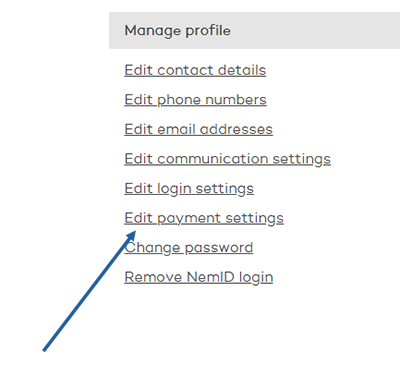
If you want to change the way you receive your invoices etc., you must edit your payment settings.

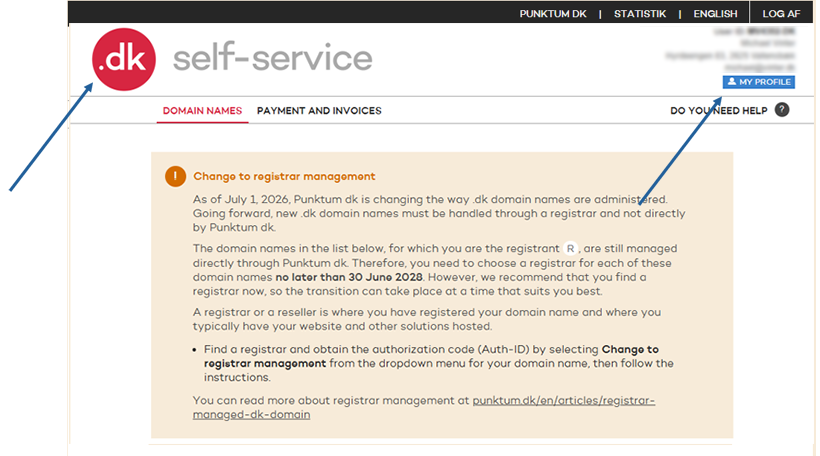
After you have logged in to the self-service, click on the .dk logo and then on “MY PROFILE”.

Frontpage og self-service

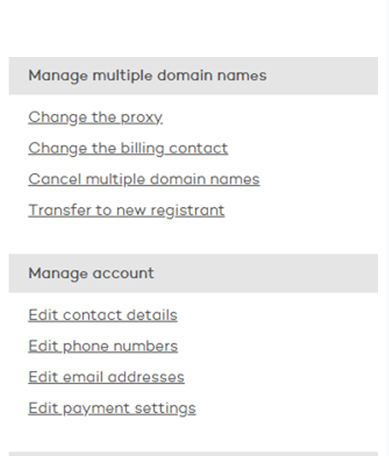
Then select "Edit payment settings"

Edit payment settings

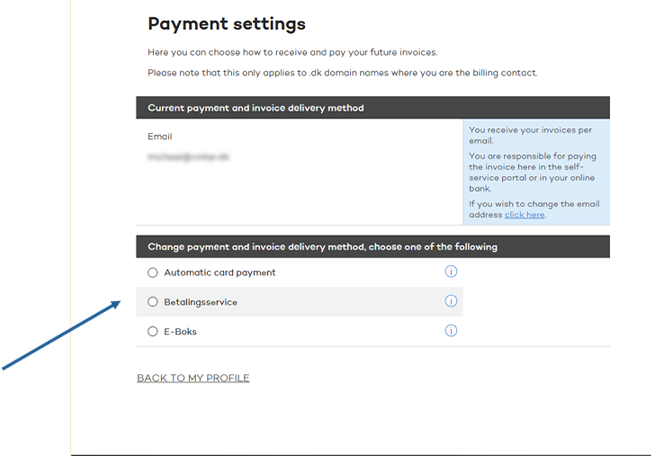
Now you can choose how future invoices etc. are sent to you.

Payment settings

Mobile version

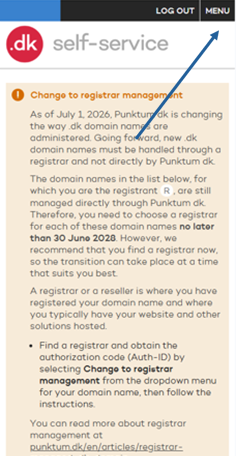
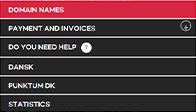
After you have logged in to self-service, click on "MENU" and then on "DOMAIN NAMES".

Mobile self serviceMenu

Tap on “Edit Payment Settings”.

Edit peyment settings

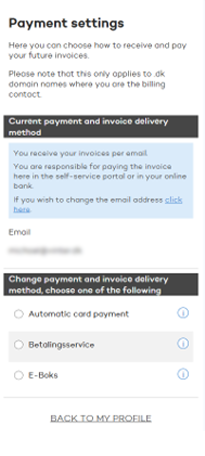
Now you can choose how future invoices etc. are sent to you.

Peyment settings mobil

No. If you have received an invoice, but subsequently canceled one or more domain names that appear on the invoice, we will send a credit note.

If you have not cancelled all the domain names specified on the invoice, you should deduct the credit note from the invoice and pay the remaining amount.

PLEASE NOTE:You may only deduct the credit note from the invoice whose invoice number is stated on the credit note.

Yes, some providers offer this service.

Your provider can request to be the payer of your .dk domain name, when the first registration period expires, and the domain name must be renewed (typically after one year).

When your provider is the payer, you will not receive an invoice from Punktum dk.

Need help?

Didn't find the answer to your question? Contact customer service, and we will help you further.

Contact customer service
Kontakt kundeservice global

Customer service is open

Monday 09:00 - 16:00
Tuesday 09:00 - 16:00
Wednesday Closed
Thursday 09:00 - 16:00
Friday 09:00 - 13:00

If you need help or have questions, please contact us, and we will get back to you as fast as possible. 

Other contact options

You can also get in touch calling us +45 33 64 60 60, alternatively we can call you back as soon as we are available again.

Customer service is closed

Monday 09:00 - 16:00
Tuesday 09:00 - 16:00
Wednesday Closed
Thursday 09:00 - 16:00
Friday 09:00 - 13:00

If you need help or have questions, please contact us, and we will get back to you as fast as possible.