Customer Service

Find help and answers to questions about your .dk domain name. Here, you can contact customer service and find guidance on registrar management, rules, and documents.

Self service

Log in to the self-service portal to view your .dk domain names and details.

Log in to the self-service portal

Questions about your invoice?

Find help regarding your invoice and payment for your .dk domain name.

Get help with invoicing

Help with ID verification

Get guidance on completing the ID check for your .dk domain name.

Get help with ID verification

Is your domain name suspended?

Read about suspension and how to get your .dk domain name restored.

Read about suspension

Choose a registrar for your .dk domain name

Going forward, your .dk domain name must be managed by a registrar. If you haven’t chosen one yet, this guide will help you through the transition, step by step.

See how to choose a registrar
Find forhanlder til dit .dk-domænenavn

Through a contact form in our WHOIS database, you may request to be contacted by the registrant, the proxy or the name server manager of a domain name.

Do the following:

  1. Enter the desired domain name in WHOIS
  2. State in the contact form whether you want contact with the registrant, proxy or name server manager
  3. Enter your email address.

Punktum dk now sends your contact information to the registrant, proxy or name server manager to the email address they have specified. Then they must initiate the contact with you.

We solely sends the email. We do no further if there are problems with the email address of the registrant, proxy or name server manager.
There are several reasons why you may experience problems logging in with MitID.

  • You may experience errors when logging in with MitID if you have a private MitID with a MitID Erhverv attached, and this is not set up correctly. You can check your setup by contacting MitID support here. Read here for more information about MitID Erhverv.
  • If you have chosen the wrong MitID, login will fail. This could be, for example, if you use your private MitID but have chosen to log in as your company or vice versa.
  • You might receive an error with the code MI000. This means that there is an error in the CPR number. 
  • You can receive error code MI004. This means that you have tried to sign in with MitID business, but have used your private MitID.

If your domain name is registered under a CVR number with a P-number, then you must ensure that the administrator for the registered MitID has signed for you to be registered as a user on MitID Erhverv, or has ordered a user certificate for you.

Instructions for connecting to MitID Erhverv:

  1.      Go to https://mitid-erhverv.dk/tilslutning/
  2.      Go down the page, select "Start connection" and follow the instructions on the page.
  3.      Accept terms.
  4.      Set up the connection as an administrator.
  5.      You must then complete the setup, where you must confirm that you want to use your private MitID for business validation.

Note that if you have several CVR numbers associated with your MitID, the connection must be accepted per CVR.

You can subsequently log in to our self-service and validate with MitID Erhverv.

If you need further guidance, please contact MitID Erhverv on +45 33 98 00 20.


No. The GDPR requires that a data processing agreement be concluded between a data controller and its data processor(s). Punktum dk, however, is not a data processor for registrants, but a data controller.

A data controller determines the purpose of the processing of personal data - and the means used for the processing.

A data processor processes personal data on behalf of - and under instructions from - the data controller.

The roles are described in detail in here.

Punktum dk processes registrants' personal data, but we also determines the purpose of the processing (primarily establishment and maintenance of the customer relationship) and the means of processing (Punktum dk's IT systems). Thus, Punktum dk is the data controller for its registrant's personal data, and therefore the legislation does not require a data processing agreement.

If you do not have your password, you can click "Help with login" and have a temporary password sent to your registered e-mail address.

Remember that you can also log in with your MitID if you have previously connected it with your profile.

If you have not previously connected a MitID, and you cannot receive login information on your current contact email with us, then do the following:

As a company:
You need to make sure that the e-mail address you have provided in the CVR register is updated to an active e-mail to which we can send login information. We must be able to see the e-mail address by public posting on CVR under "Extended company information" at https://datacvr.virk.dk/
Afterwards you must call us and inform us that you have updated your e-mail address.

As a private registrant:
You must call our customer service (33 64 60 60) from your specified contact number and have the contact email updated.
 
If none of the above is an option, you can read more here

From 31 October 2023, it will no longer be possible to use NemID.

You must therefore ensure that you have added MitID to your login at Punktum dk, which you can do in our self-service.

Here you must log in with your MitID, after which you will be asked to enter your user ID and password. Then follow the on-screen wizard to associate your MitID.

If you experience problems logging in, you can read more here

For more information about processing NemID, you can read more here

If you want to sign up for direct debit service (Betalingsservice), you can change your payment settings on our self-service portal under PAYMENT AND INVOICES > Edit payment settings.

You can also sign up directly in your online bank. Betalingsservice will then notify us of your change. 

Please note that open invoices issued before you sign up for Betalingsservice must be paid manually.

NOTE! Companies must always sign up for Betalingsservice using online banking and cannot use our self-service for this specific purpose.

You always have to unsubscribe from Betalingsservice in your online bank. After the cancellation, you will automatically receive your invoices from us at the email address you have provided with us. This is free of charge, but be aware that payment must be done manually.

Punktum dk cannot decide about who has the right to a domain name - not even if you have copyright to the domain name.

If you believe that you have the right to register the domain name, you can complain to the Complaints Board for Domain Names. The board can decide who has the most right to the domain name in question.

You will find the Complaints Board's contact information here.

On the Complaints Board's website, you can read more about how to submit a complaint to the board.

You can always try to come to an agreement with the existing registrant to have the domain name transferred to you. If the registrant's contact information is not publicly available, you can notify the registrant that you wish to get in touch with him/her via the "contact" icon when you look up the domain name in the WHOIS database.

This is a guide on how to change  the default registration settings when ordering a .dk domain name.​

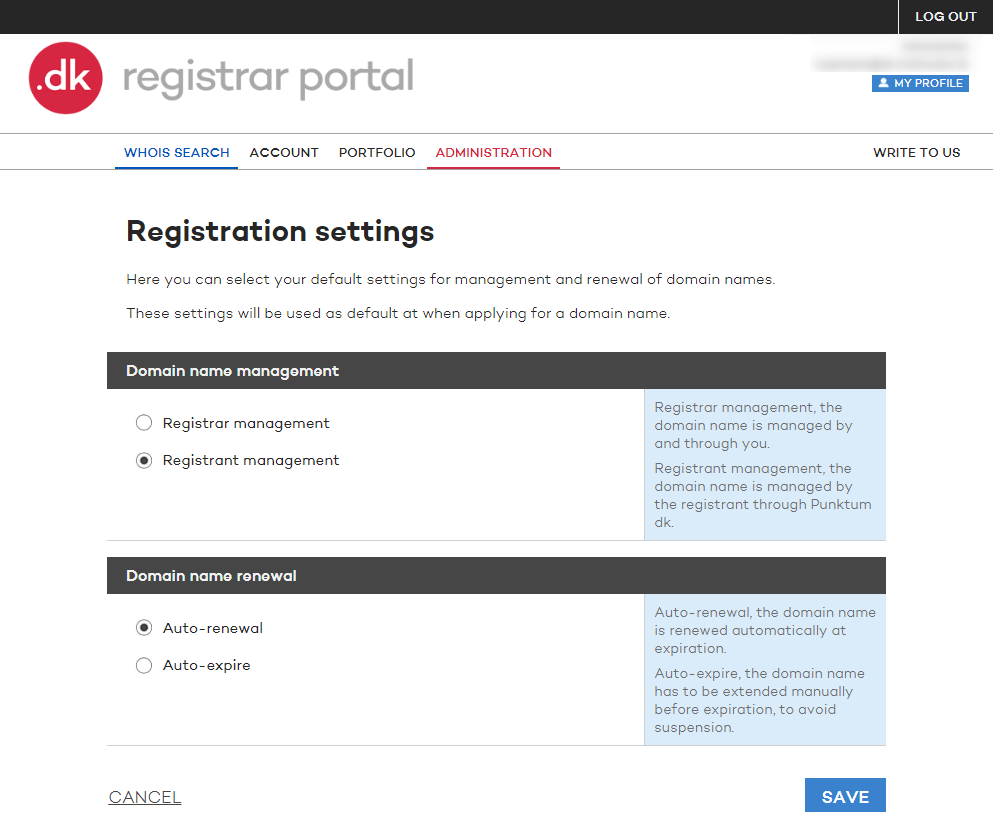
You can choose between two settings Registrar or Registrant managed and auto-renewal or auto-expire.

Registrar or Registrant managed

Registrar management, the domain name is managed by and through you.​
Registrant management, the domain name is managed by the registrant through Punktum dk.​

Auto-renewal or Auto-expire

Auto-renewal, the domain name is renewed automatically at expiration.​
Auto-expire, the domain name need to be extended manually before expiration, to avoid suspension. ​​

In order to change the settings the user/users in the registrar portal must have the role Administrator​.

Follow the instructions below:

1. Log on to the registrar portal 

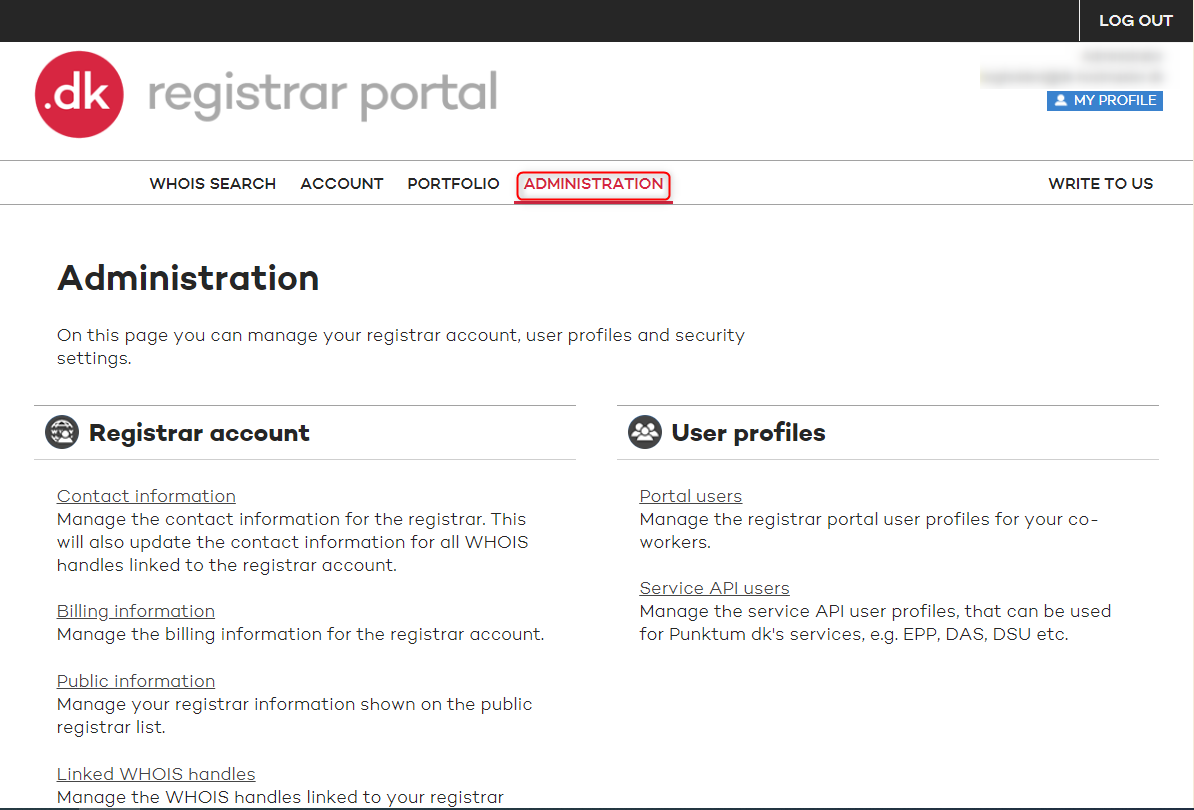
2. Click on ADMINISTRATION 

FAQ registration settings 1

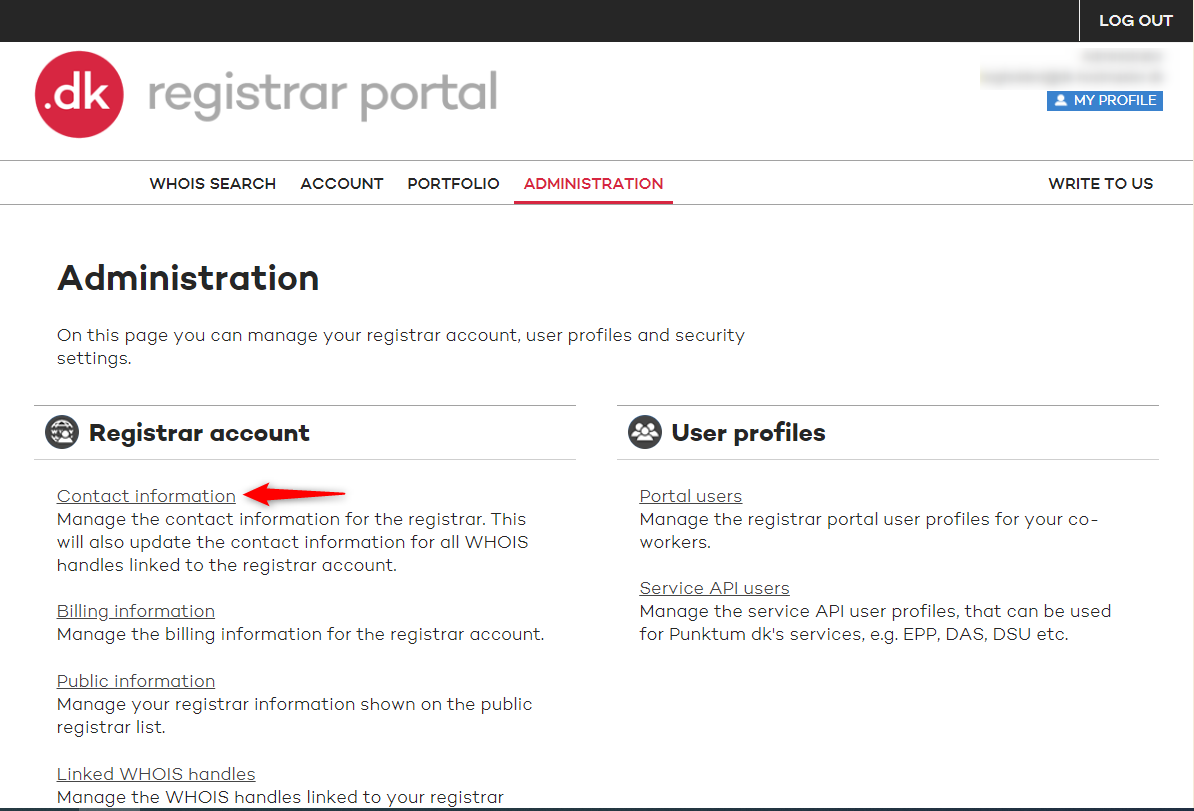
3. Under ADMINISTRATION you choose Contact information.

FAQ registration settings 2

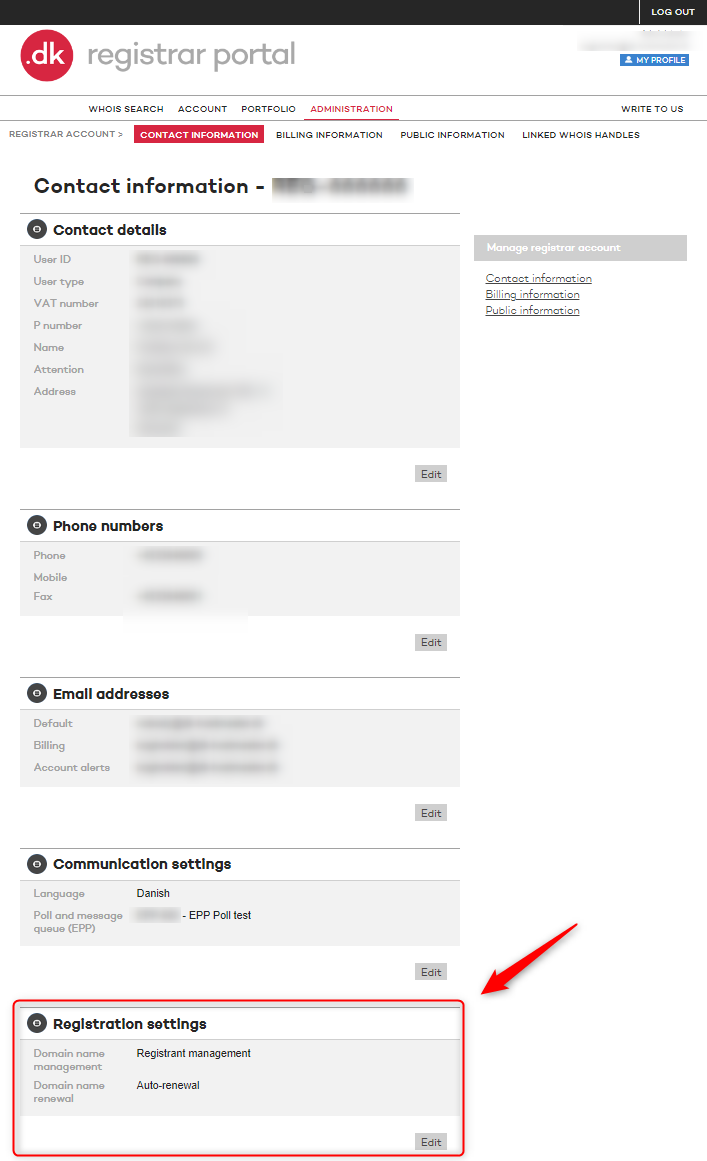
4. At the bottom of the next page you will see the option box Registration settings. Click on Edit​

FAQ registration settings 3


5. Here you have the option to change the Registration settings.​

FAQ registration settings 4​

Registrant management means that you yourself are responsible for the management of your .dk domain name.

This means that you must ensure that:

  • pay period fee to Punktum dk
  • keep your contact information up to date
  • change name servers and terminate the domain name if you need to
  • transfer the domain name if you need to

We do not charge extra for registrant management.

Prices

When you manage your .dk domain yourself with us, our prices and fees apply to you. You can see all our prices here.


Need help?

Didn't find the answer to your question? Contact customer service, and we will help you further.

Contact customer service
Kontakt kundeservice global

Customer service is open

Monday 09:00 - 16:00
Tuesday 09:00 - 16:00
Wednesday Closed
Thursday 09:00 - 16:00
Friday 09:00 - 13:00

If you need help or have questions, please contact us, and we will get back to you as fast as possible. 

Other contact options

You can also get in touch calling us +45 33 64 60 60, alternatively we can call you back as soon as we are available again.

Customer service is closed

Monday 09:00 - 16:00
Tuesday 09:00 - 16:00
Wednesday Closed
Thursday 09:00 - 16:00
Friday 09:00 - 13:00

If you need help or have questions, please contact us, and we will get back to you as fast as possible.