
Do you need to contact us?
We are ready to help you if you have any questions about your .dk domain.
Our customer service staff will respond to your inquiry as soon as possible.

If you are experiencing issues with your e-mail address or website, it may be due to one of the following reasons.
Missing payment with Punktum dk
If we have not received payment for the renewal of your .dk domain name, the domain will be suspended by us. If your domain name is suspended and you have an email or a website that includes the domain, it will no longer work.
You can restore your domain name by logging into our online self-service portal. You can follow our instructions by clicking here.
Missing validation
At Punktum dk, as the registrant, you are required to complete an ID verification when you activate your domain.
We do this to ensure accurate information and secure your right to use the domain.
If the ID verification is not completed within the given deadline, the domain will be suspended and deleted 30 days thereafter.
The domain will be automatically restored/activated once you log in to the self-service portal.
Setup with your DNS provider
When you hold the right to use a domain name, you are a customer at Punktum dk. You also have a registration with your provider, who handles your hosting (setting up e-mail or website).
It is therefore necessary that your setup with the provider is correctly configured. They may have deactivated the domain due to a lack of maintenance, such as payment and updating contact information. It is therefore important to maintain both agreements. If the problem is with the provider, you need to contact your provider to have the domain restored.
Thank you for your reply
- we are happy about that.
Hmmm, not good...
We will help you - write us.
Did you find the answer useful?
If you still have questions, we are ready to help!
The Internet works in an interaction between several technical intermediaries, each of which provides a unique service that enables the Internet user to view a website.
In connection with illegal content on the web, the primary players are:
- The person who posted the content
- The web hosting company
- The Internet service provider (the ISP, often a telecommunications company)
- The domain hosting company / The name server responsible
- Domain administrator (Punktum dk)
Thank you for your reply
- we are happy about that.
Hmmm, not good...
We will help you - write us.
Did you find the answer useful?
If you still have questions, we are ready to help!
An order for the seizure of a .dk domain name is implemented by handing the domain name over to the Danish police.
When a domain name is seized, the Danish police can decide which website the domain name must point to or refrain from pointing to a website. At the same time as the registrant can no longer use the domain name to point the internet user to a website, the registrant also loses access to all services under the domain name, including e-mail services. Confiscation of a domain name can therefore also have unintended or disproportionate consequences for the registrant's otherwise legal activities.
The illegal content is still on the Internet and can be accessed directly via the IP address.
The registrant can register a new domain name and have it pointed to the website with the illegal content.
Thank you for your reply
- we are happy about that.
Hmmm, not good...
We will help you - write us.
Did you find the answer useful?
If you still have questions, we are ready to help!
An order to "block" a specific .dk domain name is implemented by Punktum dk by deactivating the domain name and thus deactivating the "directory function". As a result, immediate access to a website is cut off.
However, the illegal content is still on the Internet and can be accessed via the IP address.
While the domain name can no longer point internet users to a website, including subpages, all services under the domain name are closed, including e-mail services. Blocking a domain name can therefore also have unintended or disproportionate consequences for the registrant's otherwise legal activities.
The registrant can register a new domain name and have it pointed to
the website with the illegal content.
Thank you for your reply
- we are happy about that.
Hmmm, not good...
We will help you - write us.
Did you find the answer useful?
If you still have questions, we are ready to help!
When a domain name is seized, the right to use the domain name is transferred to the Danish police. The police become the registrant of the domain name with all associated rights and obligations, including payment to Punktum dk, as long as the domain name is seized.
The former registrant cannot use the domain name and the police decide which website the domain name should point to or refrain from letting it point to a website. The former registrant may also not use other services associated with the domain name, including email addresses.
The illegal content is still on the Internet and can be accessed via the IP address.
Thank you for your reply
- we are happy about that.
Hmmm, not good...
We will help you - write us.
Did you find the answer useful?
If you still have questions, we are ready to help!
You must investigate to whom the warrant should be directed.
The general principle of proportionality means that the least intrusive effective means must be used. A seizure order must therefore be directed against the infringer or technical intermediaries, e.g. the web hosting company or the name server responsible. Only if this is impossible, hopeless, or insufficient, the ruling can be directed against Punktum dk.
Thank you for your reply
- we are happy about that.
Hmmm, not good...
We will help you - write us.
Did you find the answer useful?
If you still have questions, we are ready to help!
The Danish Supreme Court ruled on 23 March 2021 that blocking access to illegal content on a website must be directed against the infringer or other technical intermediaries, e.g. the web hosting company, before an injunction can be directed against Punktum dk. The order can be found here (Danish only).
This is because a deactivation of a domain name is not only important for the website, but also for other services associated with the domain name, e.g. e-mail service, which will no longer be able to be used.
A seizure order should only be directed against Punktum dk when it is difficult to act against the registrant, the web hosting company, or the name server responsible, where they are located outside of Denmark, and it is deemed proportionate to remove both access to the website and the e-mail service.
Thank you for your reply
- we are happy about that.
Hmmm, not good...
We will help you - write us.
Did you find the answer useful?
If you still have questions, we are ready to help!
You should inform Punktum dk before the court hearing. This gives Punktum dk the opportunity to appear at the court hearing or submit a declaration of waiver that they do not wish to appear at the court hearing.
Punktum dk can also provide guidance on what information must appear in the warrant in order for a seizure to be effectuated.
Thank you for your reply
- we are happy about that.
Hmmm, not good...
We will help you - write us.
Did you find the answer useful?
If you still have questions, we are ready to help!
In order for Punktum dk to implement a seizure of the domain name, it is necessary that the order also contains the following information:
- A correct indication of the domain name to be seized,
- A correct indication of the registrant's name and address,
- Information that the seizure is taking place at Punktum dk A/S, which is not a suspect in the case and
- Indication of what Punktum dk must do, i.e. how the seizure of the domain name must take place. For example, "[xxxx.dk] must be seized if the domain name is transferred to [the police unit] as a new registrant of Punktum dk A/S, who is not a suspect".
Thank you for your reply
- we are happy about that.
Hmmm, not good...
We will help you - write us.
Did you find the answer useful?
If you still have questions, we are ready to help!
You can send the ruling via the contact form on Punktum dk's website. You can find the contact form here or via Punktum dk's website, use the category "Seizure/court order".
Remember that together with the order you must submit a number of other information:
You must state if the domain name is to be transferred to an existing user ID and the e-mail address to be used for the transfer itself.
The process at Punktum dk will be faster if you also state whether the web hosting company is outside Denmark.
Thank you for your reply
- we are happy about that.
Hmmm, not good...
We will help you - write us.
Did you find the answer useful?
If you still have questions, we are ready to help!


How can we help you?
Last updated: 22 October 2026
We are currently seeing a large number of fraudulent emails about the suspension and billing of .dk domain names. Scammers may also have copied our website to make both the email and the website look convincing.
Is the message from Punktum dk?
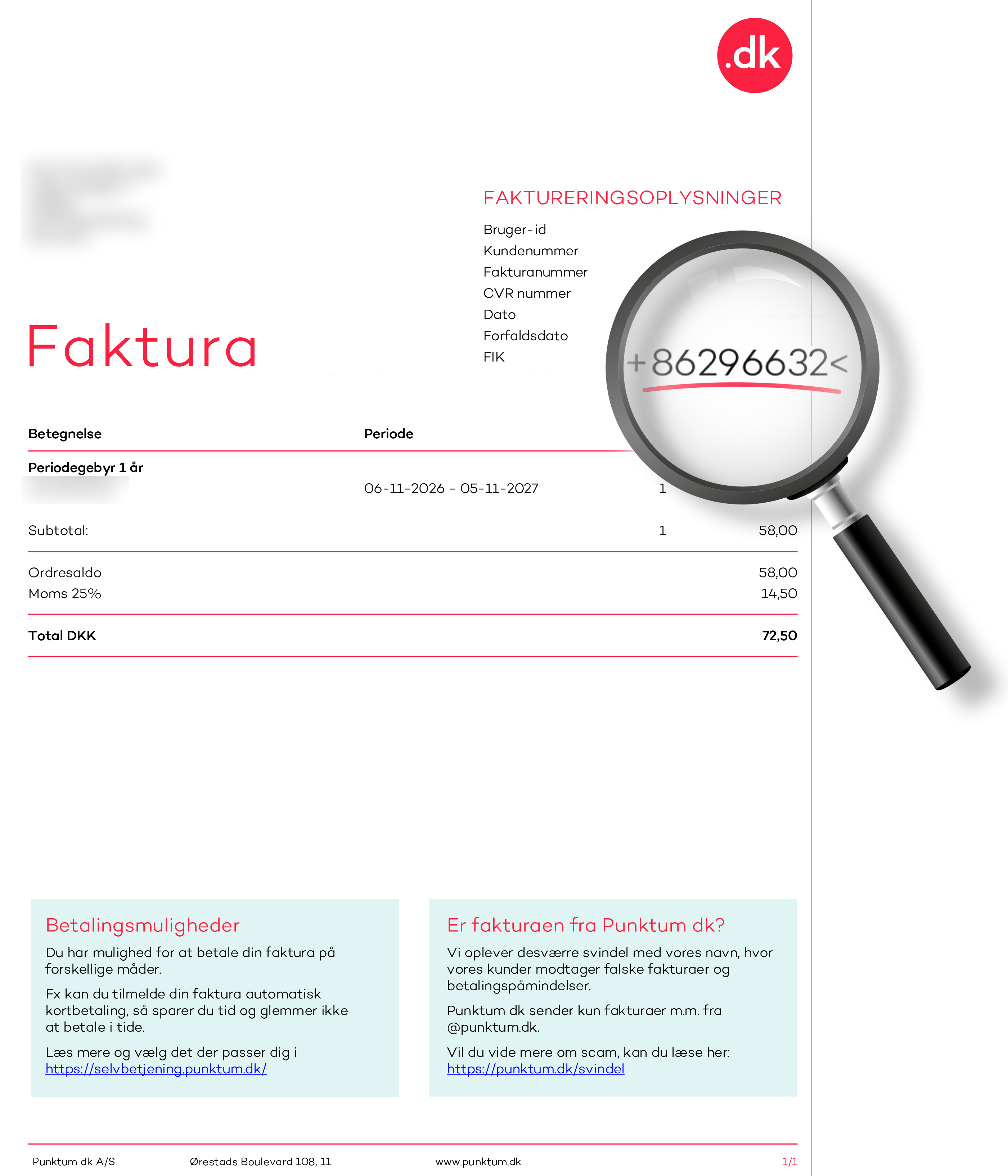
Always check the attached invoice.
Whenever we send a payment request via e-Boks or email, an invoice is always attached. The invoice shows our creditor number, 86296632, displayed as +86296632<.
If no invoice is attached, the payment request is not from us. If an invoice is attached, always check that the creditor number matches ours. If it does not match, do not pay.
If the email directs you to an online payment page, it is a scam. Do not click on the link or enter your payment details.
Below is a genuine invoice from Punktum dk with our creditor number highlighted.
Two other things you can check
Scammers can make both emails and invoices look genuine. Our invoice emails are sent from noreply@punktum.dk, but the sender address can also be forged. You therefore cannot determine whether a message is genuine based solely on its appearance and sender address.
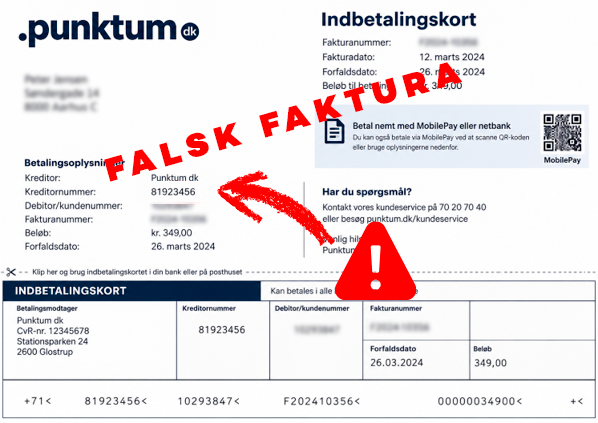
Below is a fraudulent payment slip with a creditor number that does not belong to Punktum dk.
Unsure? Check the invoice in our self-service portal
Go directly to selvbetjening.punktum.dk and log in. Under Payments and invoices, you can find your invoices and check whether the payment request is from us.
Do not use links or payment details from the suspicious email.
How can I tell if an email is fraudulent?
Our invoice emails are always sent from noreply@punktum.dk. However, scammers can send phishing emails that appear to come from Punktum dk. Sometimes they use email addresses or domain names that resemble ours. In other cases, the sender address may be forged to make the email appear to come from an address ending in @punktum.dk.
Unsure about an email?
- Do not click on links or make payments through the email.
- Do not reply to the email.
- Go directly to the .dk self-service portal.
- Log in and check the status of your domain name and payments.
- Forward the suspicious email to svindel@punktum.dk.
You can also copy the address of a suspicious link without opening it and check it on Tjekpånettet.dk.
Please note that a link-checking service cannot provide a complete guarantee. A new scam link may not yet be known to the service and may therefore not be flagged as dangerous.
Three quick checks:
- Check the sender address carefully, but remember that it may be forged.
- Hover over links without clicking to check whether the URL actually points to punktum.dk.
- Be wary of messages that pressure you to act quickly, such as “pay within 24 hours” or “your domain will be suspended today”.
We also send surveys from email addresses ending in @relationmonitor.com.
Examples of domains seen in phishing emails
@domaincenternoreply.dk
@mail.photoceramics-center.com
@svindelpunktum.dk
@domainregisters.dk
@noreplydominregister.dk
@autoconfig.xenovation.com
@edit-faktora.atlassian.net
@soleblu.bellabeauty.it
@2025.xenovation.com
@library.xenovation.com
@dummy.xenovation.com
@preprod.xenovation.com
@speedtest.xenovation.com
@recruiting.xenovation.com
@2018.xenovation.com
@test.datenschutz-grundverordnung.eu
@besor.codeburstpro.com
@partner.verifier.su
@theouterinn.retro-os.live
@4sofia.fun
@newlookconsultancy.com
@demo.asgiripirivena.lk
@sender.zohobooks.com
@kulhusekro.atlassian.net
@hubspotfree.eu1.hs-send.com
@nimbusnepal.com
@bityclips.com
@mailproxy.zohodeluge.com
@thecustomerfactorr.net
@robotique.tn
@mailling.lot.com
@punktum.in
@amian-louis.atlassian.net
@painteco.co.uk
@summersetdestinations.com
@updatee.atlassian.net
@punktum.com
@paysafe.dk
@uni-erfurt.de
@saphe-premium.atlassian.net
@saphe-dk-kundeservice.atlassian.net
@saphe-punkt.atlassian.net
@amian-louis.atlassian.net
Please note that the email addresses above may have been used without the domain registrant’s knowledge.
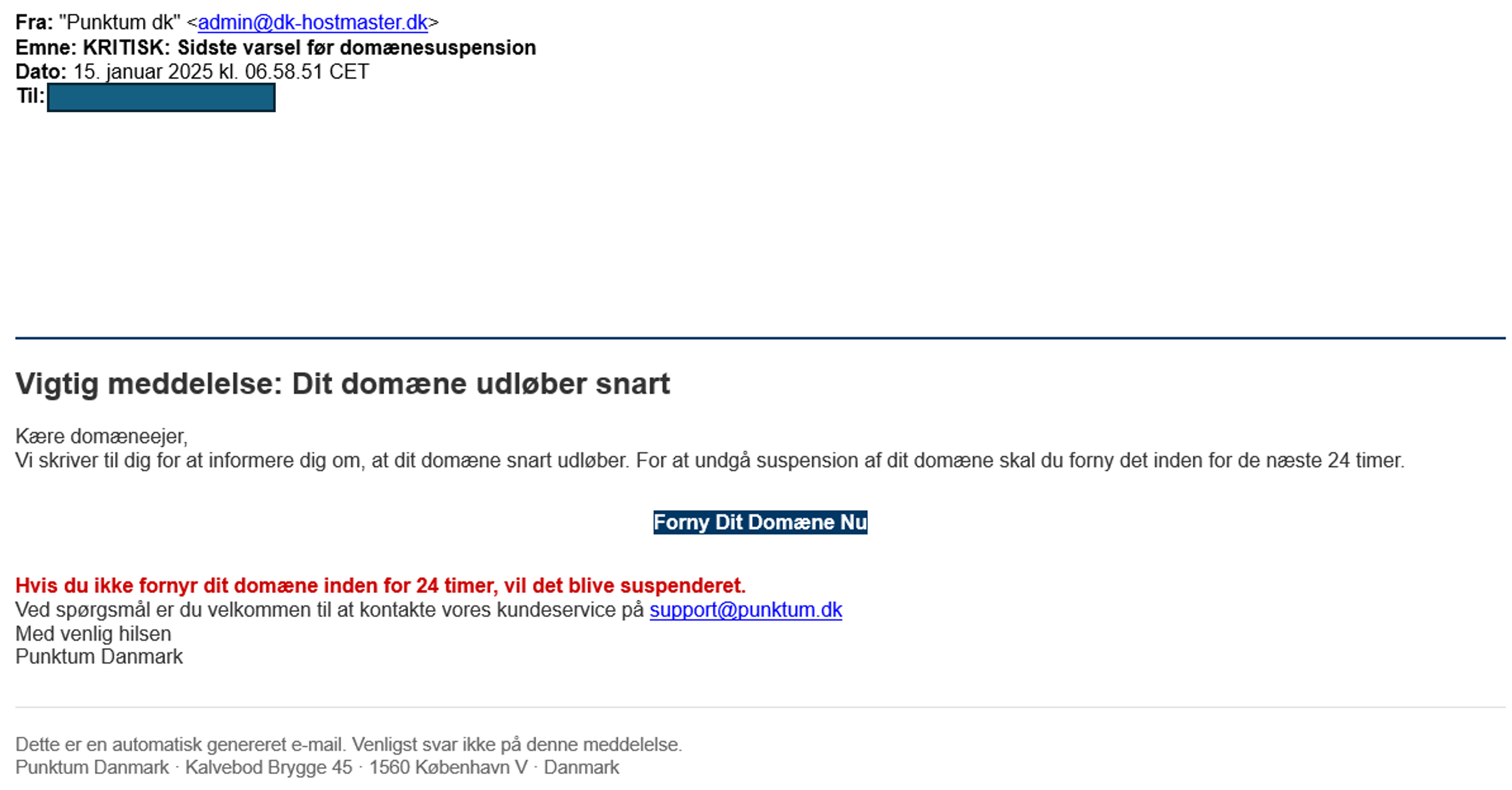
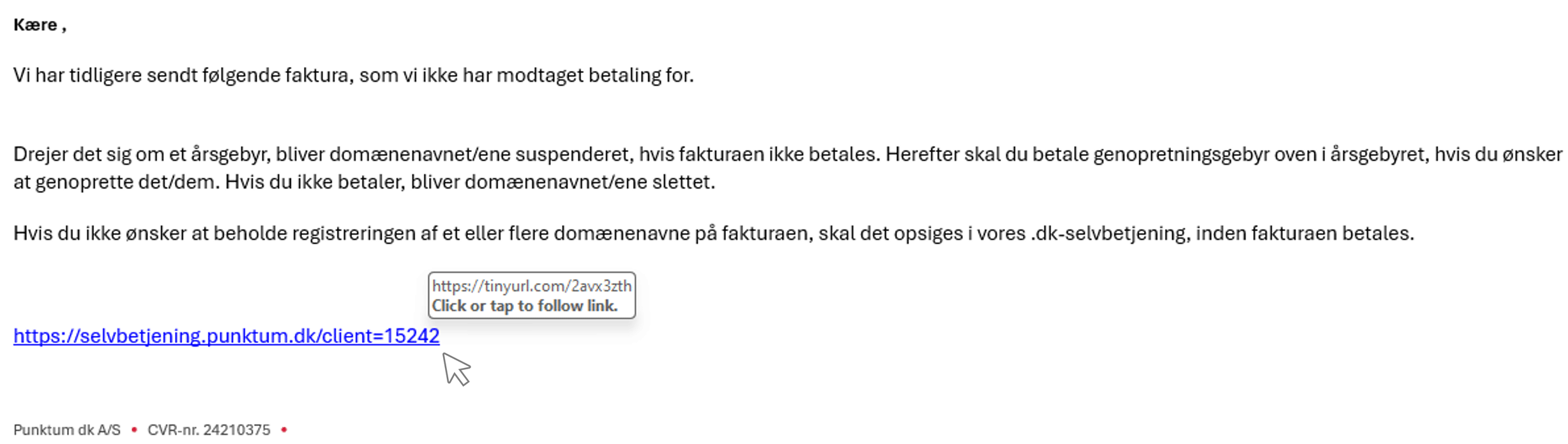

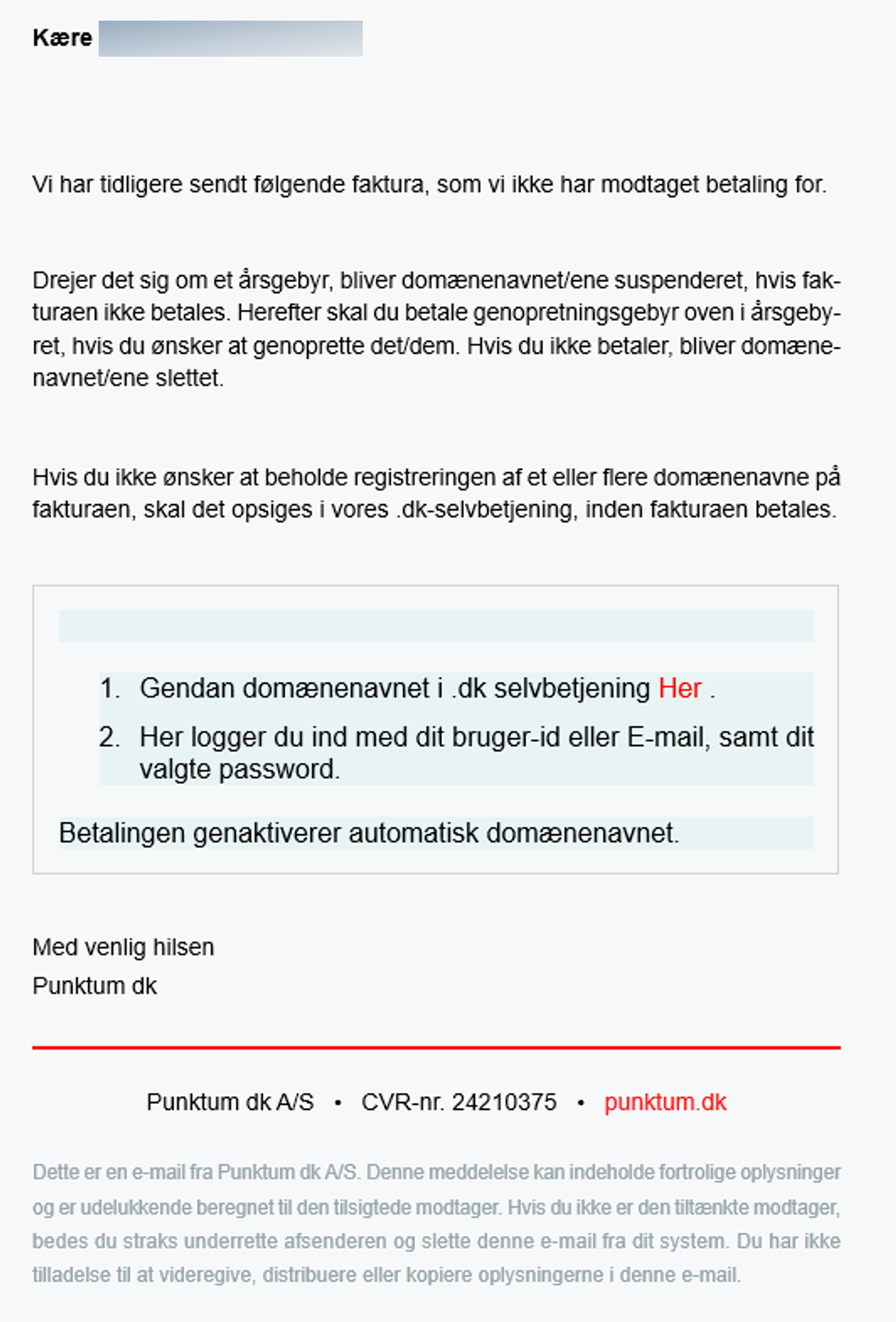

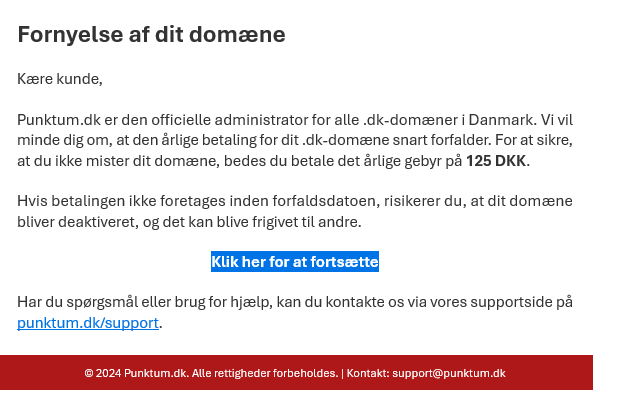
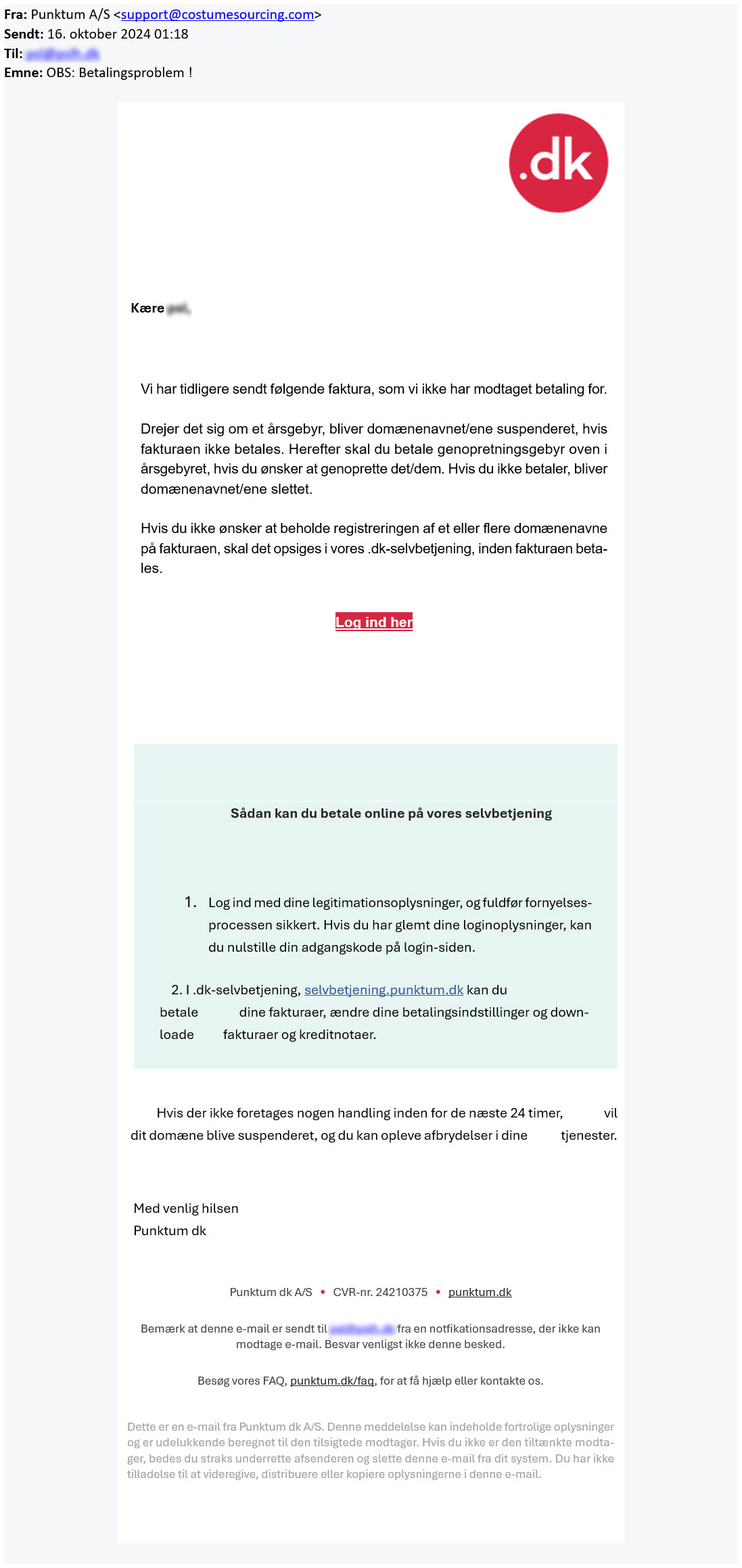
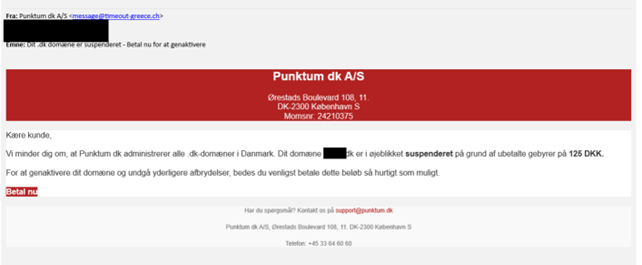
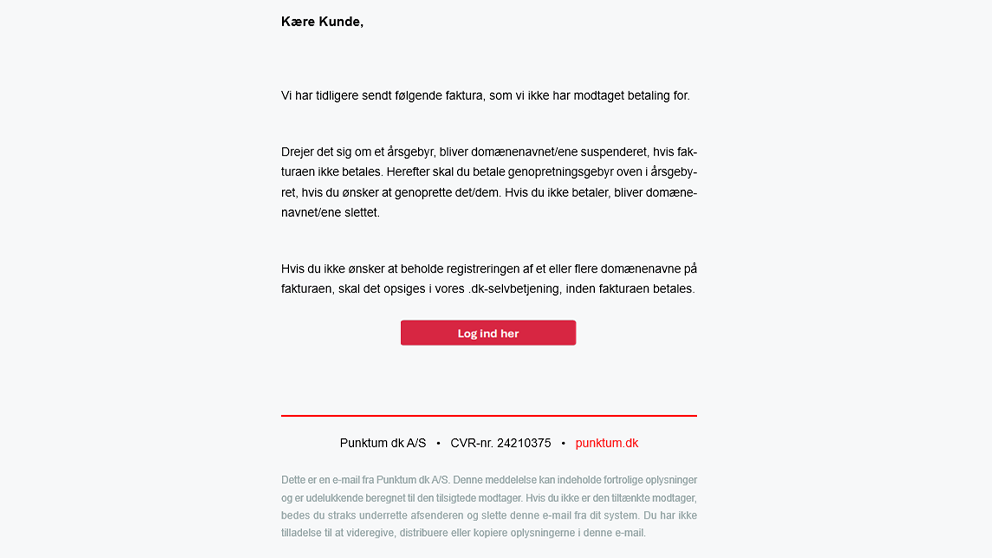
If you have filled in your login information on the fake login page, we recommend that you immediately log in to our self-service portal and change your password.
If you have received a fake email, we would like to see what it looks like. You can forward it to svindel@punktum.dk.
Have you received an email about suspension or payment?
We are also sending out legitimate emails regarding suspension. Therefore, we recommend that you log in to our self-service portal and check whether your .dk domain name has been suspended.
If your domain name is not working, it has likely been suspended. Read more here about what you can do to restore it.
Thank you for your reply
- we are happy about that.
Hmmm, not good...
We will help you - write us.
Did you find the answer useful?
If you still have questions, we are ready to help!
If you are experiencing issues with your e-mail address or website, it may be due to one of the following reasons.
Missing payment with Punktum dk
If we have not received payment for the renewal of your .dk domain name, the domain will be suspended by us. If your domain name is suspended and you have an email or a website that includes the domain, it will no longer work.
You can restore your domain name by logging into our online self-service portal. You can follow our instructions by clicking here.
Missing validation
At Punktum dk, as the registrant, you are required to complete an ID verification when you activate your domain.
We do this to ensure accurate information and secure your right to use the domain.
If the ID verification is not completed within the given deadline, the domain will be suspended and deleted 30 days thereafter.
The domain will be automatically restored/activated once you log in to the self-service portal.
Setup with your DNS provider
When you hold the right to use a domain name, you are a customer at Punktum dk. You also have a registration with your provider, who handles your hosting (setting up e-mail or website).
It is therefore necessary that your setup with the provider is correctly configured. They may have deactivated the domain due to a lack of maintenance, such as payment and updating contact information. It is therefore important to maintain both agreements. If the problem is with the provider, you need to contact your provider to have the domain restored.
Thank you for your reply
- we are happy about that.
Hmmm, not good...
We will help you - write us.
Did you find the answer useful?
If you still have questions, we are ready to help!
If your website or e-mail address is not working, it may be because we have suspended your domain name. The most common reason for doing this is that we have not received payment for the domain name.
You can easily get your website or e-mail address up and working again by restoring the domain name through your login to our online self-service portal.
When you are logged in, you can either go to "Payment and invoices" and pay the invoice under "Open invoices" or you can go to "Domain name" and choose "Restore domain name" on the select button next to your domain.
The restoration fee is DKK 125 per domain name.
If a domain name is not restored within 30 days of the date of suspension, we delete the domain name.
Do you have problems logging in to our self-service? Read more
Thank you for your reply
- we are happy about that.
Hmmm, not good...
We will help you - write us.
Did you find the answer useful?
If you still have questions, we are ready to help!
You must transfer the domain name if you want to give it to another person.
Please note, that you cannot transfer the domain if there is an unpaid invoice on the domain name. Please pay the invoice and then you can transfer the domain name.
When you have transferred the domain name you no longer have the right to use it.
Step 1
Choose "Transfer to new registrant" in the drop-down menu in the "Manage" column.
PLEASE NOTE! If you wish to transfer more than one domain name, you can find it under "Manage multiple domain names" at the bottom of the screen.
Step 2
Enter the e-mail address of the new registrant who is to have the domain and press CONTINUE.
Please be aware that, if transferring to a company, the email address provided will be published in the publicly accessible WHOIS database.
Therefore, the email address must not contain any personal information such as names or initials.
If your email address contains personal data, it must be changed via Punktum dk’s self-service portal or at your registrar.
Step 3
Make sure you entered the correct information and press CONFIRM.
The new registrant of the domain names will receive a request by e-mail to accept the transfer. The transfer will not be carried out until the new registrant has accepted.
PLEASE NOTE! If you are only proxy of the domain name the current registrant must confirm the transfer of the domain name before it can be carried out. The current registrant will receive a request by email. Once the current registrant has confirmed that the transfer may be carried out the future registrant will receive an email with a request to accept the transfer. When the future registrant has accepted the transfer it will be carried out.
Thank you for your reply
- we are happy about that.
Hmmm, not good...
We will help you - write us.
Did you find the answer useful?
If you still have questions, we are ready to help!
If you do not have your password, you can click "Help with login" and have a temporary password sent to your registered e-mail address.
Remember that you can also log in with your MitID if you have previously connected it with your profile.
If you have not previously connected a MitID, and you cannot receive login information on your current contact email with us, then do the following:
As a company:
You need to make sure that the e-mail address you have provided in the CVR register is updated to an active e-mail to which we can send login information. We must be able to see the e-mail address by public posting on CVR under "Extended company information" at https://datacvr.virk.dk/
Afterwards you must call us and inform us that you have updated your e-mail address.
As a private registrant:
You must call our customer service (33 64 60 60) from your specified contact number and have the contact email updated.
If none of the above is an option, you can read more here
Thank you for your reply
- we are happy about that.
Hmmm, not good...
We will help you - write us.
Did you find the answer useful?
If you still have questions, we are ready to help!
Do you need to contact us?
We are ready to help you if you have any questions about your .dk domain.
Our customer service staff will respond to your inquiry as soon as possible.



Customer service is open
If you need help or have questions, please contact us, and we will get back to you as fast as possible.
Other contact options
You can also get in touch calling us +45 33 64 60 60, alternatively we can call you back as soon as we are available again.
Customer service is closed
If you need help or have questions, please contact us, and we will get back to you as fast as possible.